14주차 유니티 게임프로그래밍
2024. 12. 10. 04:52ㆍ게임 프로그래밍/유니티 프로그래밍
반응형
실습1
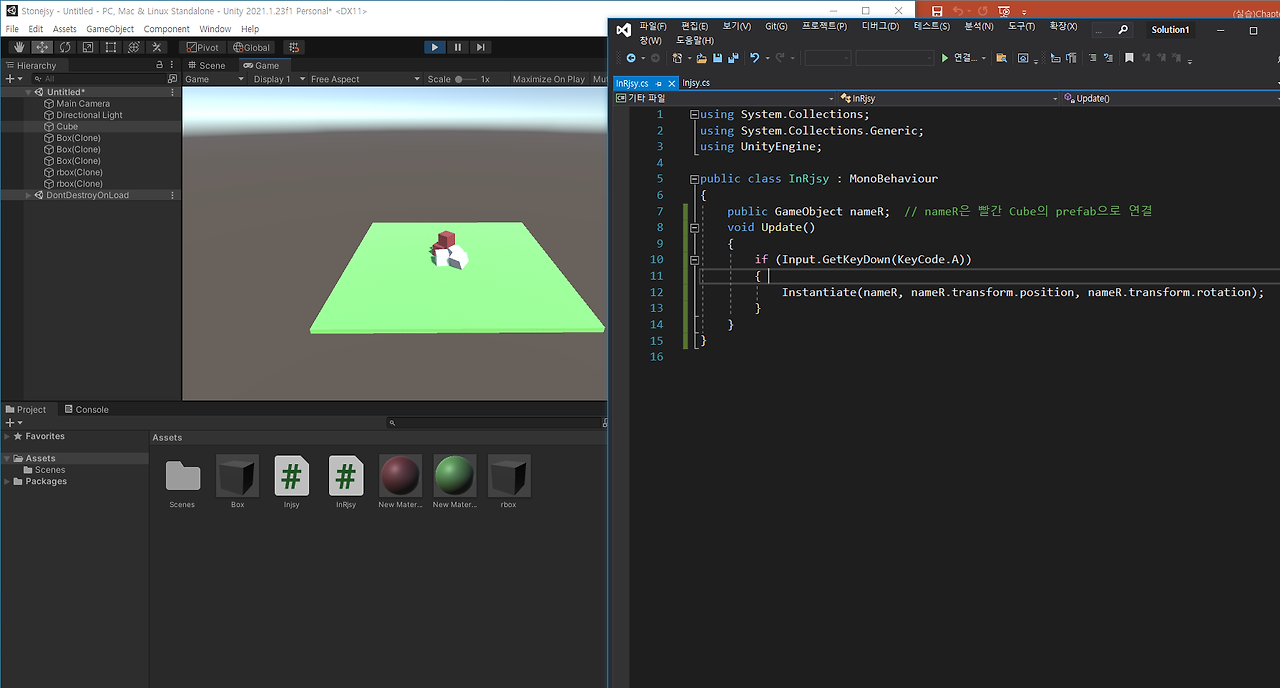
실습2
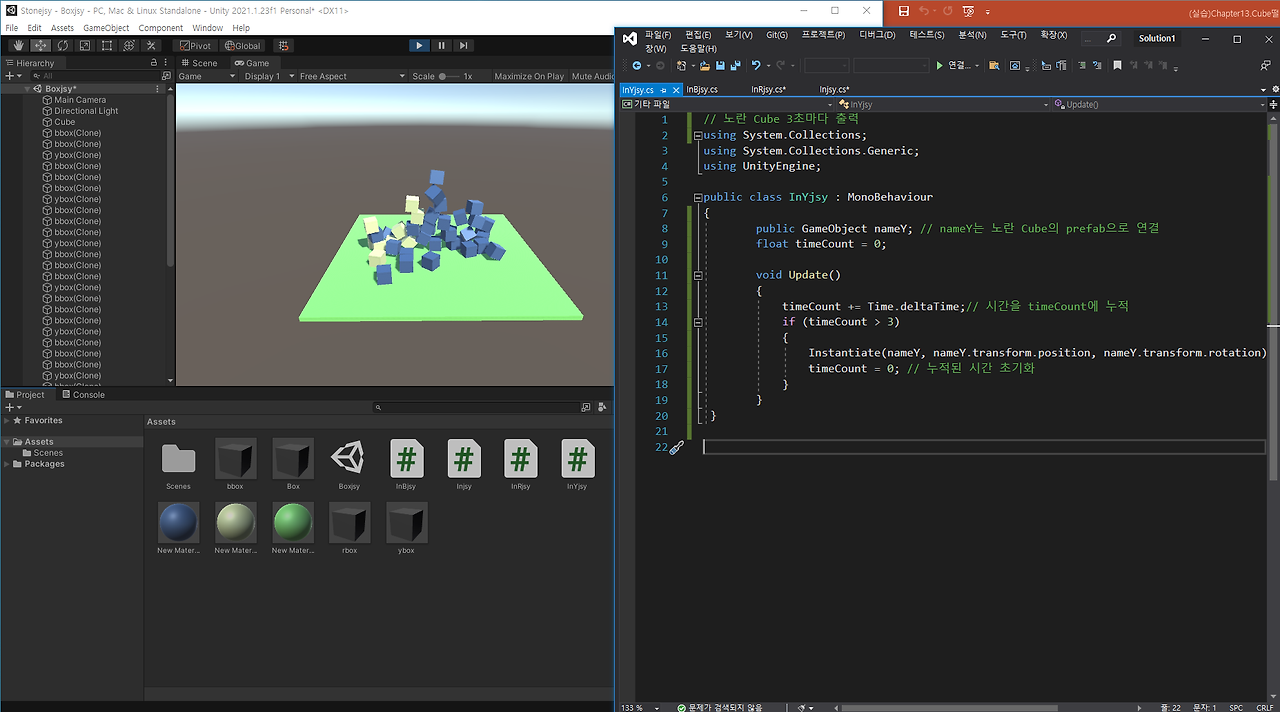
실습3
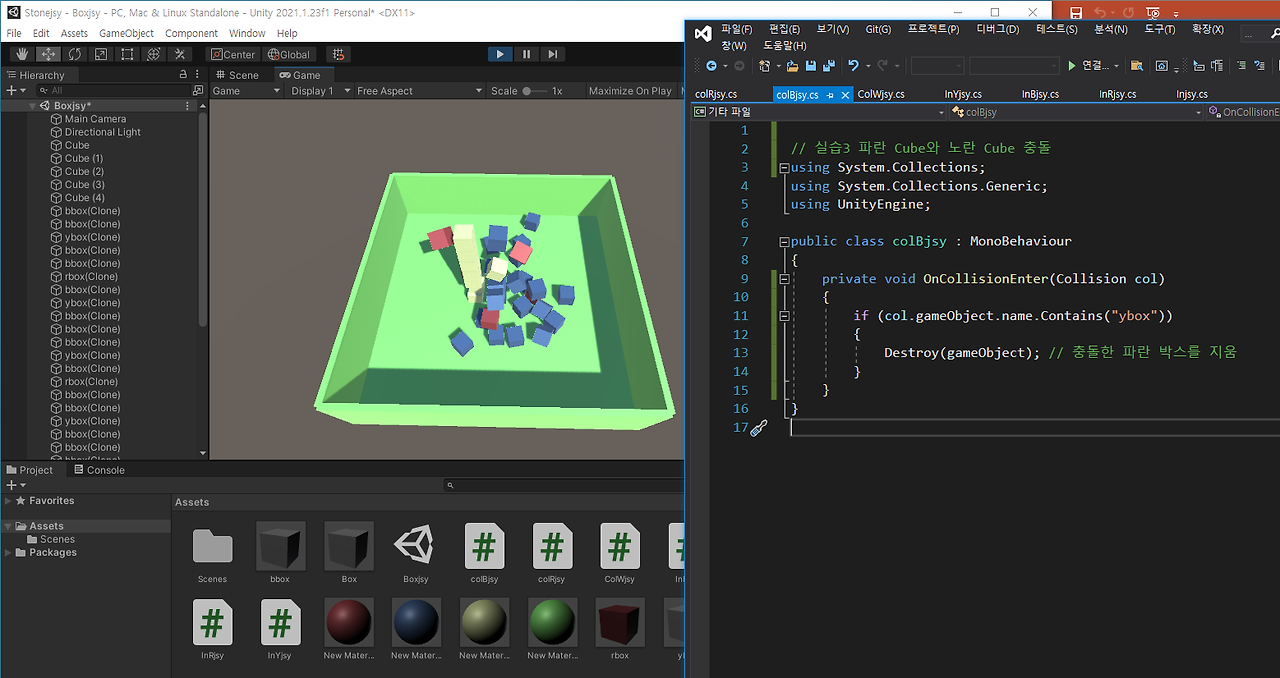
실습4

실습5

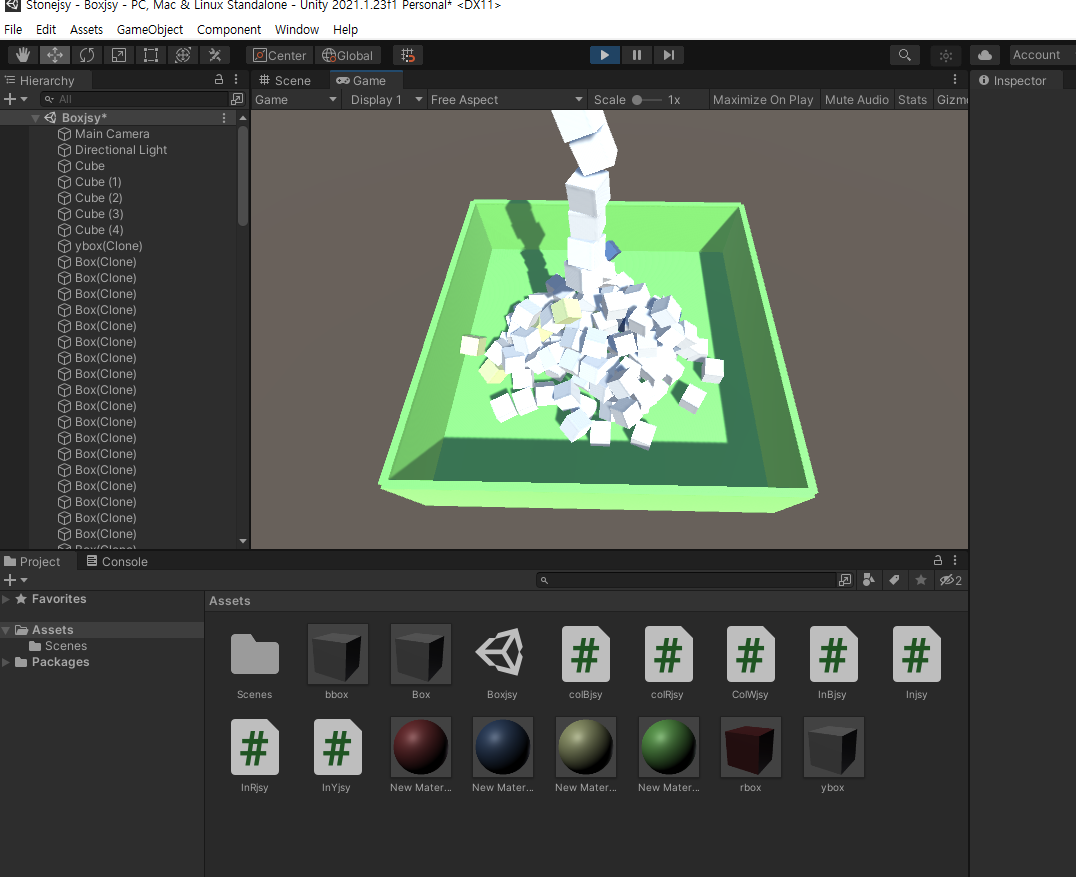
실습6 주석 제거 해서 빨간 박스 안사라지게
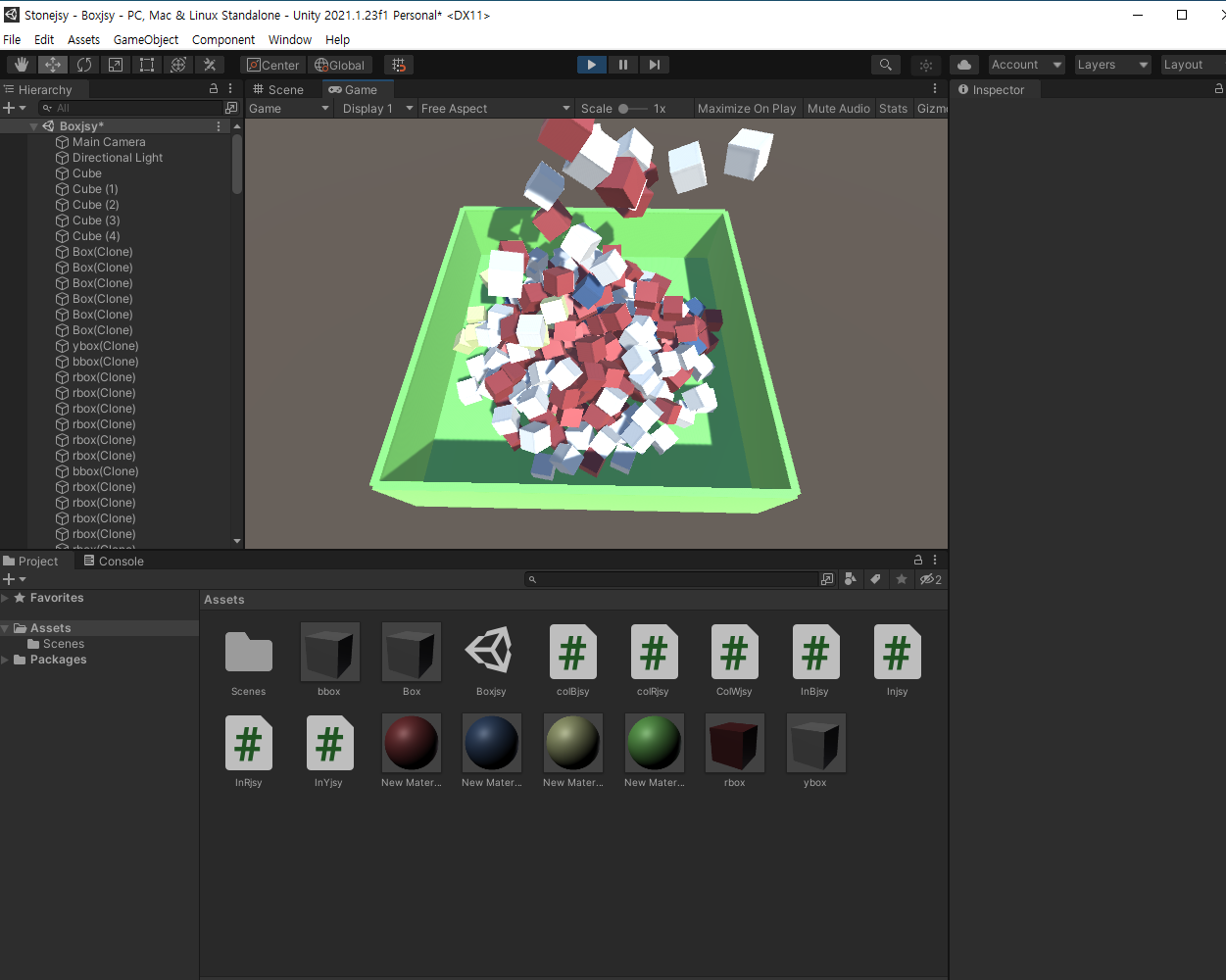
실습6 주석 제거 안하고 빨간 박스 사라지게
실습 응용 공 생성 + 튀어오르기
S , X 키 누르면 각각 공 생성
3, 5 초에 한번씩 각각 공 생성
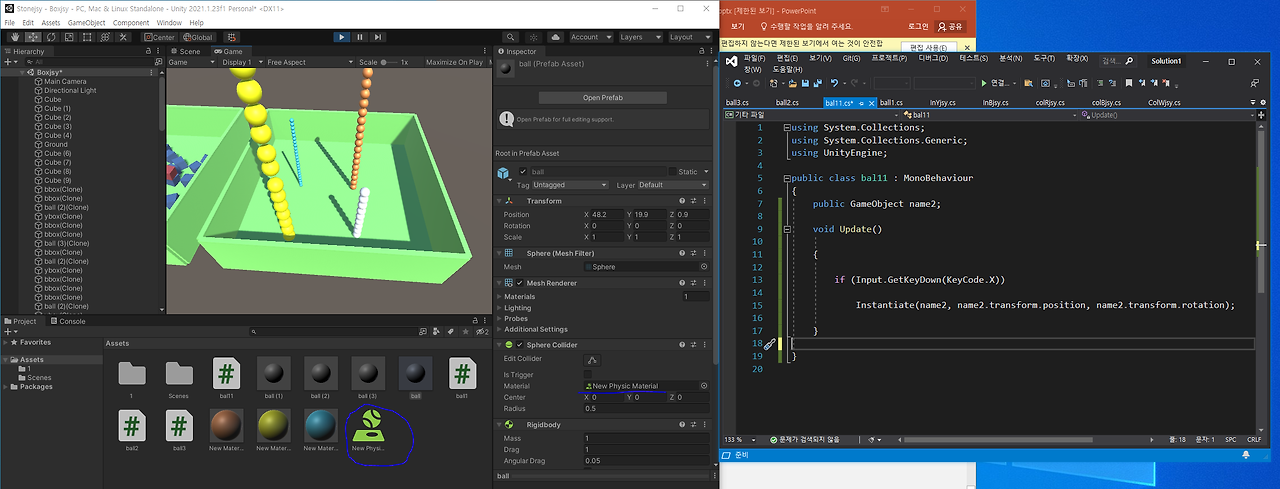
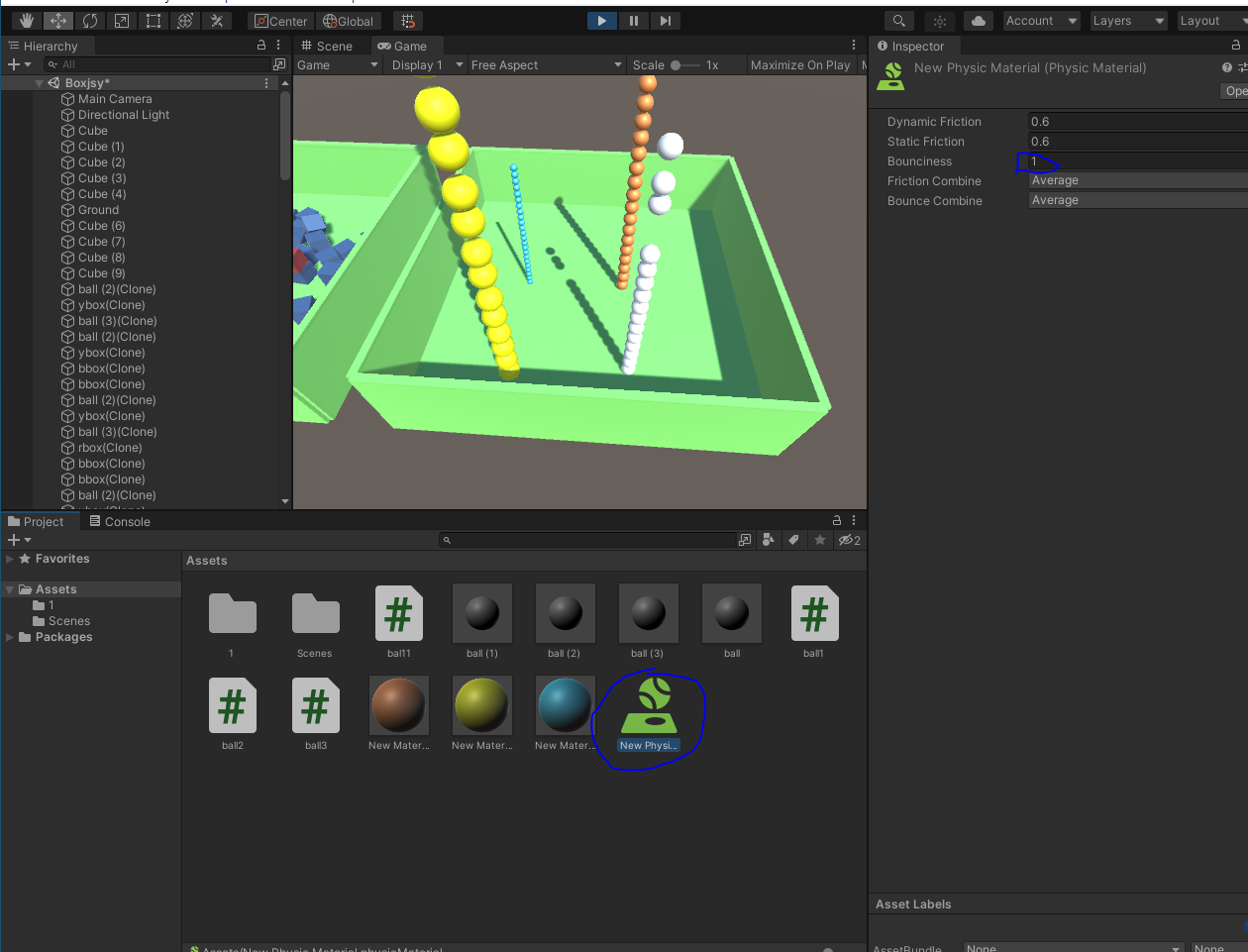
//Z키를 누르면 복제본 생성


using System.Collections;

using System.Collections.Generic;

using UnityEngine;


public class Injsy : MonoBehaviour

{

    public GameObject nameC; // nameC의 하얀 Cube의 prefab으로 연결

    void Update()

    {

        if (Input.GetKeyDown(KeyCode.Z))

            Instantiate(nameC, nameC.transform.position, nameC.transform.rotation);

    }

}

ㅡㅡㅡㅡㅡㅡㅡㅡㅡㅡㅡㅡㅡㅡㅡㅡㅡㅡㅡㅡㅡㅡㅡㅡㅡㅡㅡㅡㅡㅡㅡ

//실습1 prefab을 이용하여 Cube떨어뜨리기

using System.Collections;

using System.Collections.Generic;

using UnityEngine;


public class InRjsy : MonoBehaviour

{

    public GameObject nameR;  // nameR은 빨간 Cube의 prefab으로 연결

    float timeR = 0;

    void Update()

    {

        if (Input.GetKeyDown(KeyCode.A))

        {

            Instantiate(nameR, nameR.transform.position, nameR.transform.rotation);

        }

    }

}

ㅡㅡㅡㅡㅡㅡㅡㅡㅡㅡㅡㅡㅡㅡㅡㅡㅡㅡㅡㅡㅡㅡㅡㅡ

// 1초마다 자동으로 나타나는 Cube

using System.Collections;

using System.Collections.Generic;

using UnityEngine;


public class InBjsy : MonoBehaviour

{

    public GameObject nameB; // nameB는 파란 Cube의 prefab으로 연결

    float timeCount = 0;


    void Update()

    {

        timeCount += Time.deltaTime;// 시간을 timeCount에 누적

        if (timeCount > 1)

        {

            Instantiate(nameB, nameB.transform.position, nameB.transform.rotation);

            timeCount = 0; // 누적된 시간 초기화

        }

    }

}

ㅡㅡㅡㅡㅡㅡㅡㅡㅡㅡㅡㅡㅡㅡㅡㅡㅡㅡㅡㅡㅡㅡㅡㅡㅡㅡ

//실습2 노란 Cube 3초마다 출력

using System.Collections;

using System.Collections.Generic;

using UnityEngine;


public class InYjsy : MonoBehaviour

{

        public GameObject nameY; // nameY는 노란 Cube의 prefab으로 연결

        float timeCount = 0;


        void Update()

        {

            timeCount += Time.deltaTime;// 시간을 timeCount에 누적

            if (timeCount > 3)

            {

                Instantiate(nameY, nameY.transform.position, nameY.transform.rotation);

                timeCount = 0; // 누적된 시간 초기화

            }

        }

 }

ㅡㅡㅡㅡㅡㅡㅡㅡㅡㅡㅡㅡㅡㅡㅡㅡㅡㅡㅡㅡㅡㅡㅡㅡㅡㅡㅡㅡ

// 하얀 Cube와 빨간 Cube 충돌


using System.Collections;

using System.Collections.Generic;

using UnityEngine;


public class ColWjsy : MonoBehaviour

{

    private void OnCollisionEnter(Collision col)

    {

        if (col.gameObject.name.Contains("rbox"))

        {

            Destroy(col.gameObject); // 충돌한 빨간 박스를 지움

        }

    }


}

ㅡㅡㅡㅡㅡㅡㅡㅡㅡㅡㅡㅡㅡㅡㅡㅡㅡㅡㅡㅡㅡㅡㅡㅡㅡㅡㅡㅡㅡㅡㅡㅡㅡㅡㅡㅡㅡ


// 실습3 파란 Cube와 노란 Cube 충돌

using System.Collections;

using System.Collections.Generic;

using UnityEngine;


public class colBjsy : MonoBehaviour

{

    private void OnCollisionEnter(Collision col)

    {

        if (col.gameObject.name.Contains("ybox"))

        {

            Destroy(gameObject); // 충돌한 파란 박스를 지움

        }

    }

}

ㅡㅡㅡㅡㅡㅡㅡㅡㅡㅡㅡㅡㅡㅡㅡㅡㅡㅡㅡㅡㅡㅡㅡㅡㅡㅡㅡㅡㅡ

//실습4 빨강색 Cube가 5초 간격으로 생겨나도록

using System.Collections;

using System.Collections.Generic;

using UnityEngine;


public class InRjsy : MonoBehaviour

{

    public GameObject nameR;  // nameR은 빨간 Cube의 prefab으로 연결

    float timeR = 0;

    void Update()

    {

        if (Input.GetKeyDown(KeyCode.A))

        {

            Instantiate(nameR, nameR.transform.position, nameR.transform.rotation);

        }

        timeR += Time.deltaTime; // 시간을 timeCount에 누적

        if (timeR > 5)

        {

            Instantiate(nameR, nameR.transform.position, nameR.transform.rotation);

            timeR = 0; // 누적된 시간 초기화

        }

    }

}

ㅡㅡㅡㅡㅡㅡㅡㅡㅡㅡㅡㅡㅡㅡㅡㅡㅡㅡㅡㅡㅡㅡㅡㅡㅡㅡㅡㅡㅡㅡㅡㅡㅡㅡㅡㅡㅡㅡㅡ

//실습5 빨간Cube와 파란Cube가 충돌하면 빨간 Cube가 사라지도록

using System.Collections;

using System.Collections.Generic;

using UnityEngine;


public class colRjsy : MonoBehaviour

{

    private void OnCollisionEnter(Collision col)

    {

        if (col.gameObject.name.Contains("bbox"))

        {

            Destroy(gameObject); // 충돌한 빨간 박스를 지움

        }

    }

}

ㅡㅡㅡㅡㅡㅡㅡㅡㅡㅡㅡㅡㅡㅡㅡㅡㅡㅡㅡㅡㅡㅡㅡㅡㅡㅡㅡㅡㅡㅡㅡㅡㅡㅡㅡㅡㅡㅡㅡㅡㅡㅡㅡ

// S키 누르면 공 생성

using System.Collections;

using System.Collections.Generic;

using UnityEngine;


public class ball1 : MonoBehaviour

{

    public GameObject name1;


    void Update()


    {


        if (Input.GetKeyDown(KeyCode.S))


            Instantiate(name1, name1.transform.position, name1.transform.rotation);


    }

}

ㅡㅡㅡㅡㅡㅡㅡㅡㅡㅡㅡㅡㅡㅡㅡㅡㅡㅡㅡㅡㅡㅡㅡㅡㅡㅡㅡㅡㅡㅡㅡㅡㅡㅡㅡㅡㅡㅡㅡㅡㅡㅡㅡㅡ

// X키 누르면 공 생성

using System.Collections;

using System.Collections.Generic;

using UnityEngine;


public class bal11 : MonoBehaviour

{

    public GameObject name2;


    void Update()


    {


        if (Input.GetKeyDown(KeyCode.X))


            Instantiate(name2, name2.transform.position, name2.transform.rotation);


    }

// 충돌 시 위로 튀어오르는 코드 추가voidOnCollisionEnter(Collision other){GetComponent<Rigidbody>().velocity = Vector3.up *5;}

}

ㅡㅡㅡㅡㅡㅡㅡㅡㅡㅡㅡㅡㅡㅡㅡㅡㅡㅡㅡㅡㅡㅡㅡㅡㅡㅡㅡㅡㅡㅡㅡㅡㅡㅡㅡㅡㅡㅡㅡㅡㅡ

//3초마다 공추가

using System.Collections;

using System.Collections.Generic;

using UnityEngine;


public class ball2 : MonoBehaviour

{

    public GameObject name3;

    float timeCount = 0;


    void Update()

    {

        timeCount += Time.deltaTime;// 시간을 timeCount에 누적

        if (timeCount > 3)

        {

            Instantiate(name3, name3.transform.position, name3.transform.rotation);

            timeCount = 0; // 누적된 시간 초기화

        }

    }

}

ㅡㅡㅡㅡㅡㅡㅡㅡㅡㅡㅡㅡㅡㅡㅡㅡㅡㅡㅡㅡㅡㅡㅡㅡㅡㅡㅡㅡㅡㅡㅡㅡㅡㅡㅡㅡㅡㅡㅡ

// 5초에 한번씩 공 생성

using System.Collections;

using System.Collections.Generic;

using UnityEngine;


public class ball3 : MonoBehaviour

{

    public GameObject name4;

    float timeCount = 0;


    void Update()

    {

        timeCount += Time.deltaTime;// 시간을 timeCount에 누적

        if (timeCount > 5)

        {

            Instantiate(name4, name4.transform.position, name4.transform.rotation);

            timeCount = 0; // 누적된 시간 초기화

        }

    }

}'게임 프로그래밍 > 유니티 프로그래밍' 카테고리의 다른 글
| 13주차 유니티 게임 프로그래밍 (0) | 2024.12.10 |
|---|---|
| 12주차 유니티 게임프로그래밍 (0) | 2024.12.10 |
| 11주차 유니티 게임 프로그래밍 (0) | 2024.12.10 |
| 10주차 유니티 게임프로그래밍 (0) | 2024.12.10 |
| 9주차 유니티 게임 프로그래밍 (0) | 2024.12.10 |