13주차 유니티 게임 프로그래밍
2024. 12. 10. 04:52ㆍ게임 프로그래밍/유니티 프로그래밍
반응형
실습1
실습2
실습3
실습4
실습5

실습6
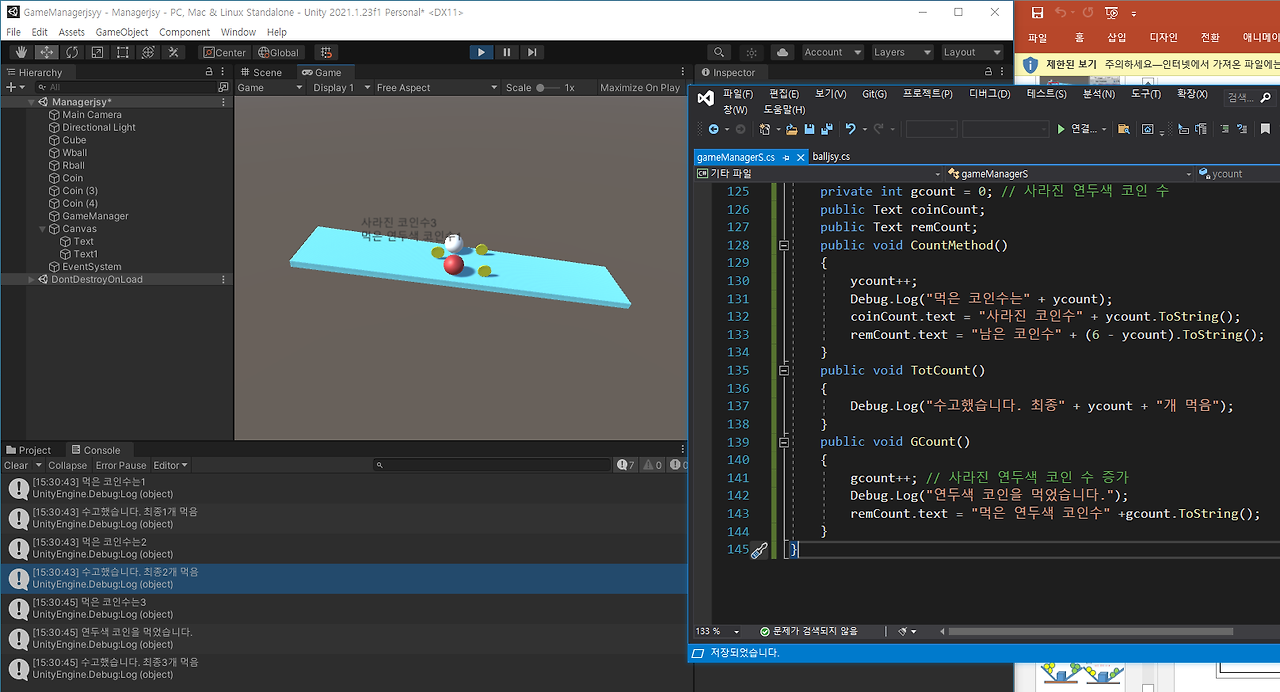
실습7
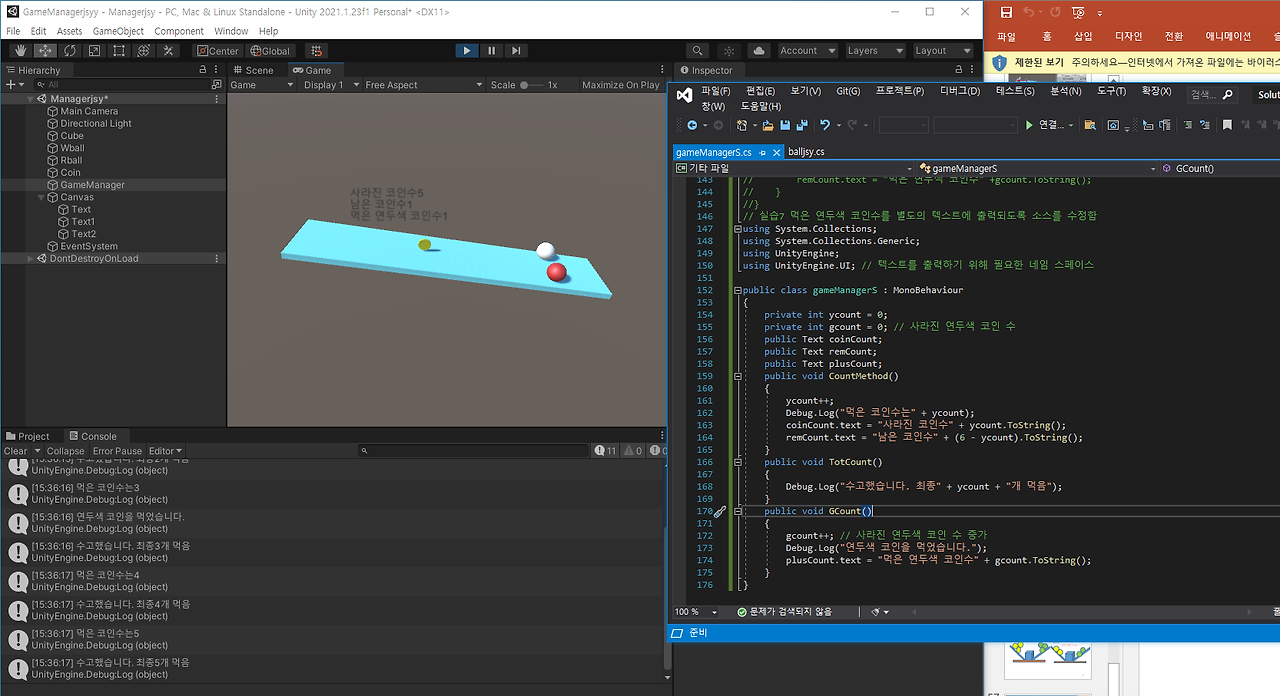
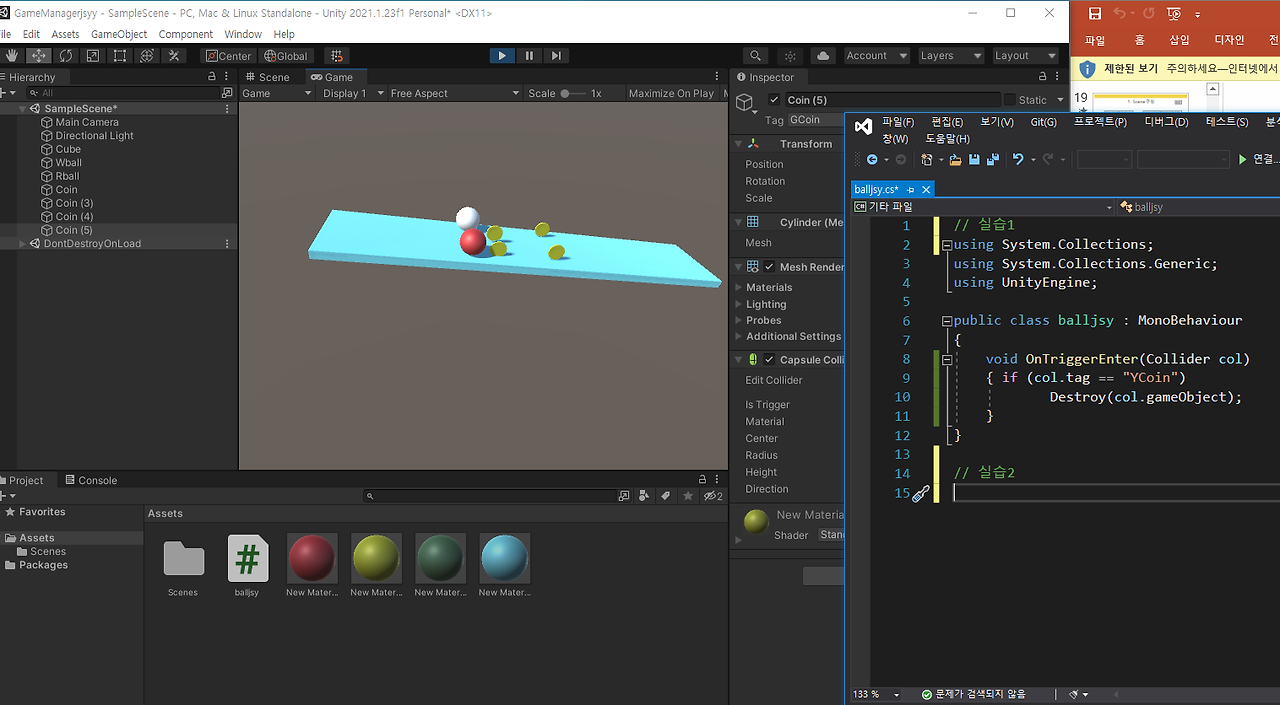
// 실습1 ‘ball약자’스크립트를 생성하여 tag가

// ‘YCoin’인 객체, 즉 공이 동전과 충돌하면 동전이 사라짐


using System.Collections;

using System.Collections.Generic;

using UnityEngine;


public class balljsy : MonoBehaviour

{

    void OnTriggerEnter(Collider col)

    {

        if (col.tag == "YCoin")

            Destroy(col.gameObject);

    }

}


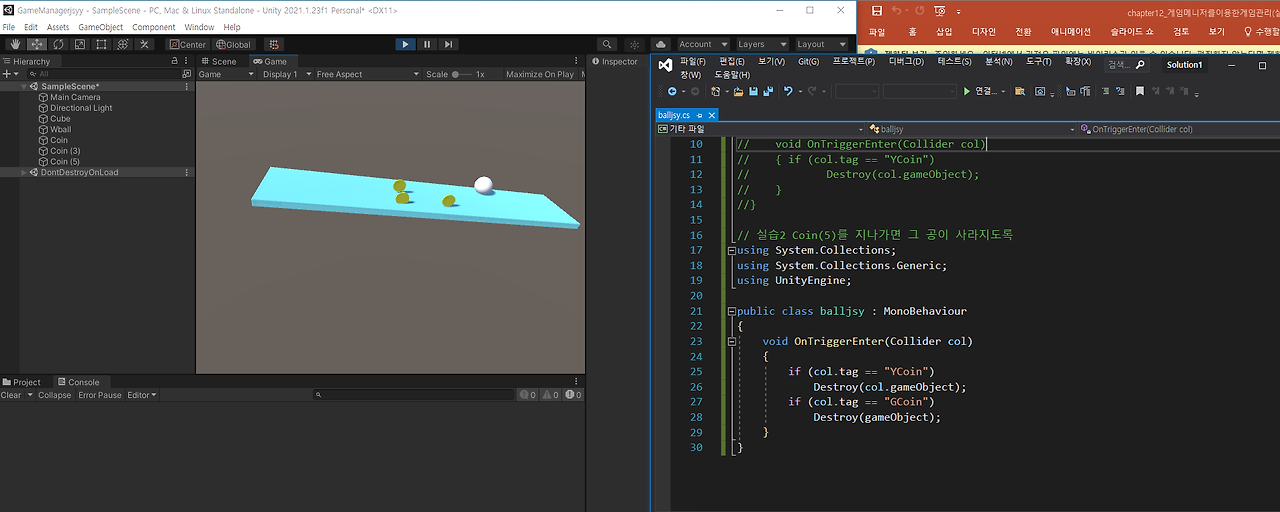
// 실습2 Coin(5)를 지나가면 그 공이 사라지도록

using System.Collections;

using System.Collections.Generic;

using UnityEngine;


public class balljsy : MonoBehaviour

{

    void OnTriggerEnter(Collider col)

    {

        if (col.tag == "YCoin")

            Destroy(col.gameObject);

        if (col.tag == "GCoin")

            Destroy(gameObject);

    }

}


// GameManager를 이용한 코인수 구하기

// ‘ball약자’소스에서 GameManager가 가지고 있는 메서드 CountMethod()호출

using System.Collections;

using System.Collections.Generic;

using UnityEngine;


public class balljsy : MonoBehaviour

{

    GameObject GM;

    void OnTriggerEnter(Collider col)

    {

        if (col.tag == "YCoin")

        {

            Destroy(col.gameObject);

            GM = GameObject.Find("GameManager");

            GM.GetComponent<gameManagerS>().CountMethod();

        }

    }

}


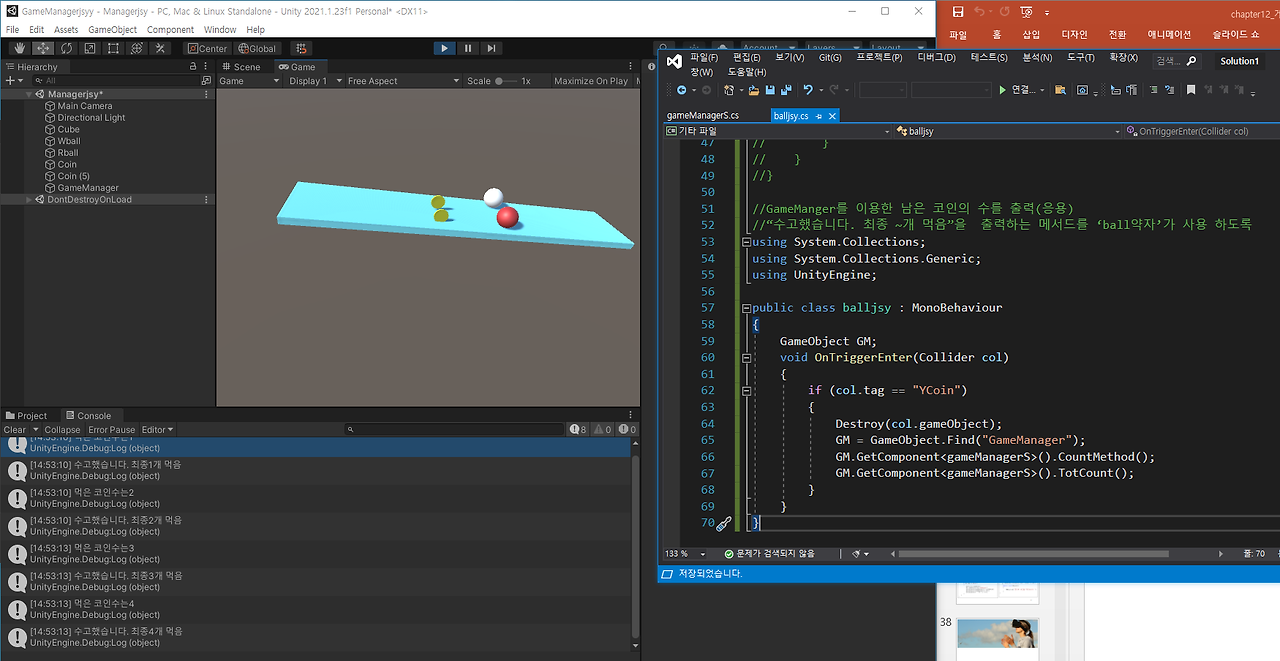
// 실습3 GameManger를 이용한 남은 코인의 수를 출력(응용)

//“수고했습니다. 최종 ~개 먹음”을  출력하는 메서드를 ‘ball약자’가 사용 하도록

using System.Collections;

using System.Collections.Generic;

using UnityEngine;


public class balljsy : MonoBehaviour

{

    GameObject GM;

    void OnTriggerEnter(Collider col)

    {

        if (col.tag == "YCoin")

        {

            Destroy(col.gameObject);

            GM = GameObject.Find("GameManager");

            GM.GetComponent<gameManagerS>().CountMethod();

            GM.GetComponent<gameManagerS>().TotCount();

        }

    }

}


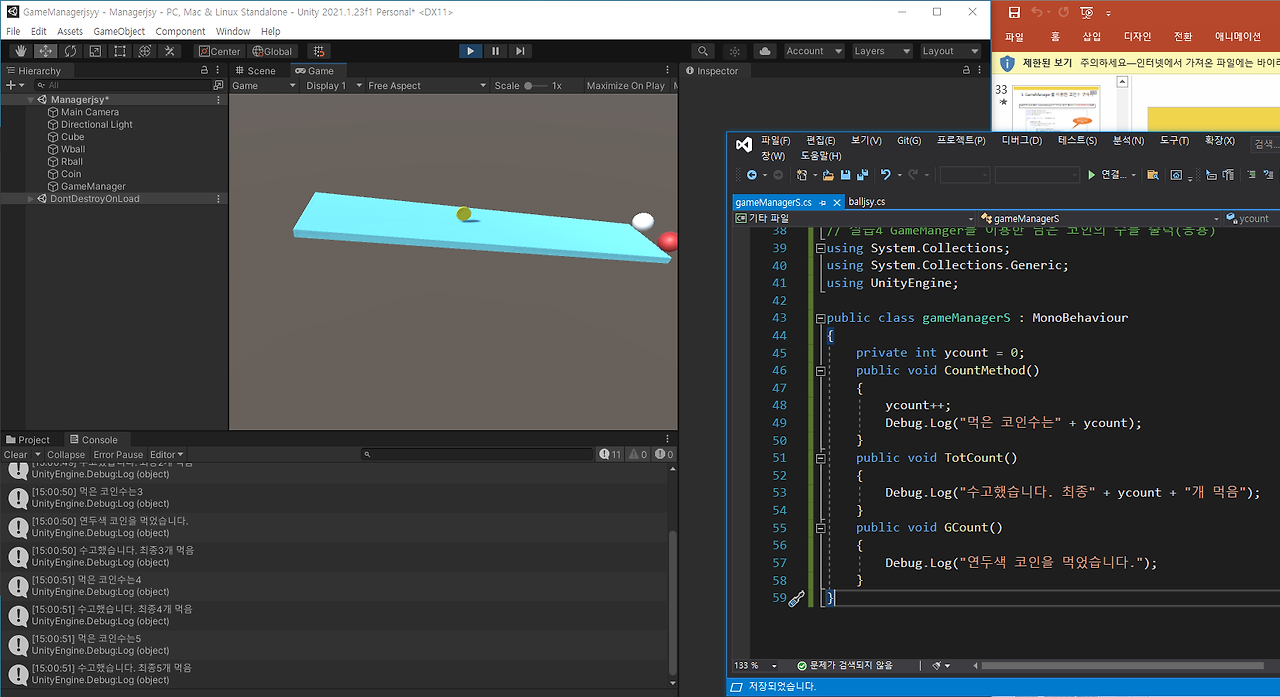
실습4 GameManger를 이용한 남은 코인의 수를 출력(응용)


Text의 이름을 coinCount로 정의하고, 이 Text에 떨어진 코인 수 출력


실습5 남아있는 코인 수 Text에 출력


//실습6 연두색 코인을 먹을 경우

//그 수를 텍스트에 출력하도록 아래 소스의 (가),(나)를 채우시오

/ 아래 코드로 위의 4개가 모두 활용 가능함


using System.Collections;

using System.Collections.Generic;

using UnityEngine;


public class balljsy : MonoBehaviour

{

    GameObject GM;

    void OnTriggerEnter(Collider col)

    {

        if (col.tag == "YCoin")

        {

            Destroy(col.gameObject);

            GM = GameObject.Find("GameManager");

            GM.GetComponent<gameManagerS>().CountMethod();

            GM.GetComponent<gameManagerS>().TotCount();

        }

        if (col.tag == "GCoin")

        {

            Destroy(col.gameObject);

            GM = GameObject.Find("GameManager");

            GM.GetComponent<gameManagerS>().CountMethod();

            GM.GetComponent<gameManagerS>().GCount();

            GM.GetComponent<gameManagerS>().TotCount();

        }

    }

}

ㅡㅡㅡㅡㅡㅡㅡㅡㅡㅡㅡㅡㅡㅡㅡㅡㅡㅡㅡㅡㅡㅡㅡㅡㅡㅡㅡㅡㅡㅡㅡㅡㅡㅡㅡㅡㅡ

// GameManager를 이용한 코인수 구하기

// ‘ball약자’소스에서 GameManager가 가지고 있는 메서드 CountMethod()호출


using System.Collections;

using System.Collections.Generic;

using UnityEngine;


public class gameManagerS : MonoBehaviour

{

    private int ycount = 0;

    public void CountMethod()

    {

        ycount++;

        Debug.Log("먹은 코인수는" + ycount);

    }

}


//실습3 GameManger를 이용한 남은 코인의 수를 출력(응용)

//“수고했습니다. 최종 ~개 먹음”을  출력하는 메서드를 ‘ball약자’가 사용 하도록


using System.Collections;

using System.Collections.Generic;

using UnityEngine;


public class gameManagerS : MonoBehaviour

{

    private int ycount = 0;

    public void CountMethod()

    {

        ycount++;

        Debug.Log("먹은 코인수는" + ycount);

    }

    public void TotCount()

    {

        Debug.Log("수고했습니다. 최종" + ycount + "개 먹음");

    }

}


// 실습4 GameManger를 이용한 남은 코인의 수를 출력(응용)

using System.Collections;

using System.Collections.Generic;

using UnityEngine;


public class gameManagerS : MonoBehaviour

{

    private int ycount = 0;

    public void CountMethod()

    {

        ycount++;

        Debug.Log("먹은 코인수는" + ycount);

    }

    public void TotCount()

    {

        Debug.Log("수고했습니다. 최종" + ycount + "개 먹음");

    }

    public void GCount()

    {

        Debug.Log("연두색 코인을 먹었습니다.");

    }

}


//Text의 이름을 coinCount로 정의하고, 이 Text에 떨어진 코인 수 출력

using System.Collections;

using System.Collections.Generic;

using UnityEngine;

using UnityEngine.UI; // 텍스트를 출력하기 위해 필요한 네임 스페이스


public class gameManagerS : MonoBehaviour

{

    private int ycount = 0;

    public Text coinCount;

    public void CountMethod()

    {

        ycount++;

        Debug.Log("먹은 코인수는" + ycount);

        coinCount.text = "사라진 코인수" + ycount.ToString();

    }

    public void TotCount()

    {

        Debug.Log("수고했습니다. 최종" + ycount + "개 먹음");

    }

    public void GCount()

    {

        Debug.Log("연두색 코인을 먹었습니다.");

    }

}


//실습5 남아있는 코인 수 Text에 출력

using System.Collections;

using System.Collections.Generic;

using UnityEngine;

using UnityEngine.UI; // 텍스트를 출력하기 위해 필요한 네임 스페이스


public class gameManagerS : MonoBehaviour

{

    private int ycount = 0;

    public Text coinCount;

    public Text remCount;

    public void CountMethod()

    {

        ycount++;

        Debug.Log("먹은 코인수는" + ycount);

        coinCount.text = "사라진 코인수" + ycount.ToString();

        remCount.text = "남은 코인수" + (6 - ycount).ToString();

    }

    public void TotCount()

    {

        Debug.Log("수고했습니다. 최종" + ycount + "개 먹음");

    }

    public void GCount()

    {

        Debug.Log("연두색 코인을 먹었습니다.");

    }

}


//실습6 연두색 코인을 먹을 경우

//그 수를 텍스트에 출력하도록 아래 소스의 (가),(나)를 채우시오

using System.Collections;

using System.Collections.Generic;

using UnityEngine;

using UnityEngine.UI; // 텍스트를 출력하기 위해 필요한 네임 스페이스


public class gameManagerS : MonoBehaviour

{

    private int ycount = 0;

    private int gcount = 0; // 사라진 연두색 코인 수

    public Text coinCount;

    public Text remCount;

    public void CountMethod()

    {

        ycount++;

        Debug.Log("먹은 코인수는" + ycount);

        coinCount.text = "사라진 코인수" + ycount.ToString();

        remCount.text = "남은 코인수" + (6 - ycount).ToString();

    }

    public void TotCount()

    {

        Debug.Log("수고했습니다. 최종" + ycount + "개 먹음");

    }

    public void GCount()

    {

        gcount++; // 사라진 연두색 코인 수 증가

        Debug.Log("연두색 코인을 먹었습니다.");

        remCount.text = "먹은 연두색 코인수" + gcount.ToString();

    }

}

// 실습7 먹은 연두색 코인수를 별도의 텍스트에 출력되도록 소스를 수정함

using System.Collections;

using System.Collections.Generic;

using UnityEngine;

using UnityEngine.UI; // 텍스트를 출력하기 위해 필요한 네임 스페이스


public class gameManagerS : MonoBehaviour

{

    private int ycount = 0;

    private int gcount = 0; // 사라진 연두색 코인 수

    public Text coinCount;

    public Text remCount;

    public Text plusCount;

    public void CountMethod()

    {

        ycount++;

        Debug.Log("먹은 코인수는" + ycount);

        coinCount.text = "사라진 코인수" + ycount.ToString();

        remCount.text = "남은 코인수" + (6 - ycount).ToString();

    }

    public void TotCount()

    {

        Debug.Log("수고했습니다. 최종" + ycount + "개 먹음");

    }

    public void GCount()

    {

        gcount++; // 사라진 연두색 코인 수 증가

        Debug.Log("연두색 코인을 먹었습니다.");

        plusCount.text = "먹은 연두색 코인수" + gcount.ToString();

    }

}'게임 프로그래밍 > 유니티 프로그래밍' 카테고리의 다른 글
| 14주차 유니티 게임프로그래밍 (0) | 2024.12.10 |
|---|---|
| 12주차 유니티 게임프로그래밍 (0) | 2024.12.10 |
| 11주차 유니티 게임 프로그래밍 (0) | 2024.12.10 |
| 10주차 유니티 게임프로그래밍 (0) | 2024.12.10 |
| 9주차 유니티 게임 프로그래밍 (0) | 2024.12.10 |