spring ai 6,7,8일차 / , springai4
2026. 5. 18. 20:10ㆍ대우개발원 수업 내용/spring기반 ai
반응형
• 동기 응답과 스트리밍 응답 비교
• Zero-Shot / Few-Shot 프롬프트 비교
• System Prompt 활용
• Reactive Stream(flux) 처리
를 하기 위해서
springai4 프로젝트 생성
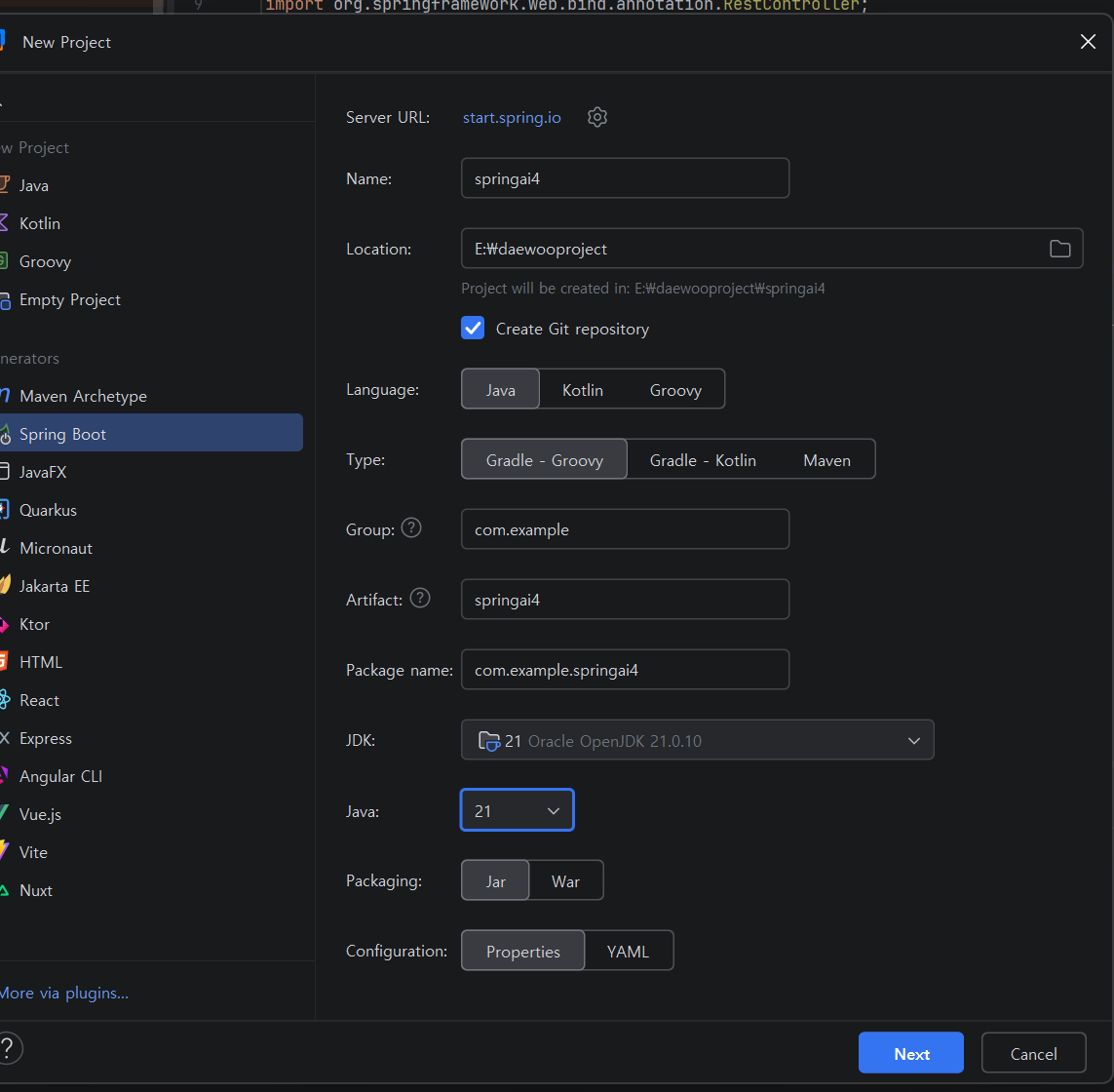
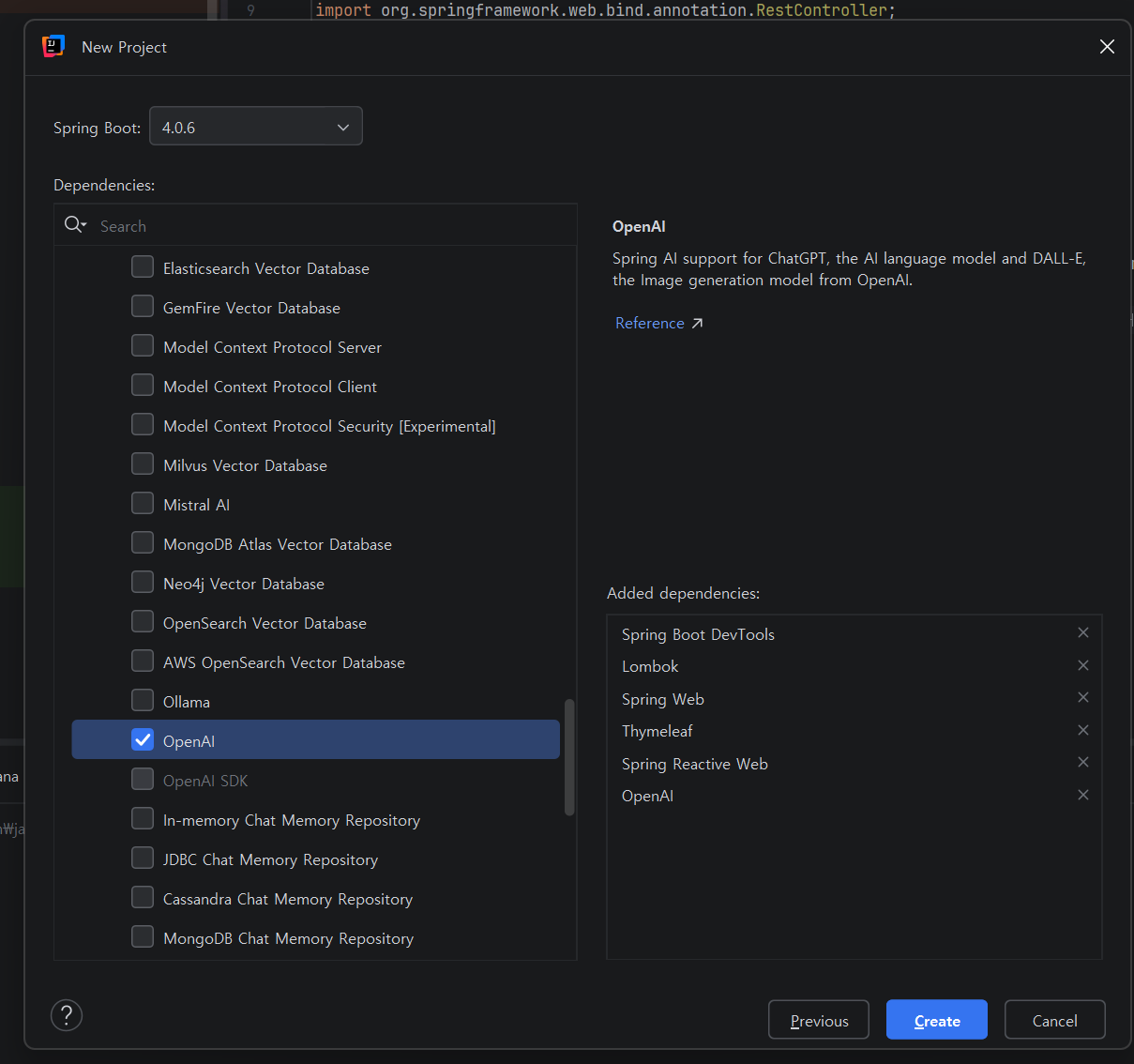
해당 내용 확인
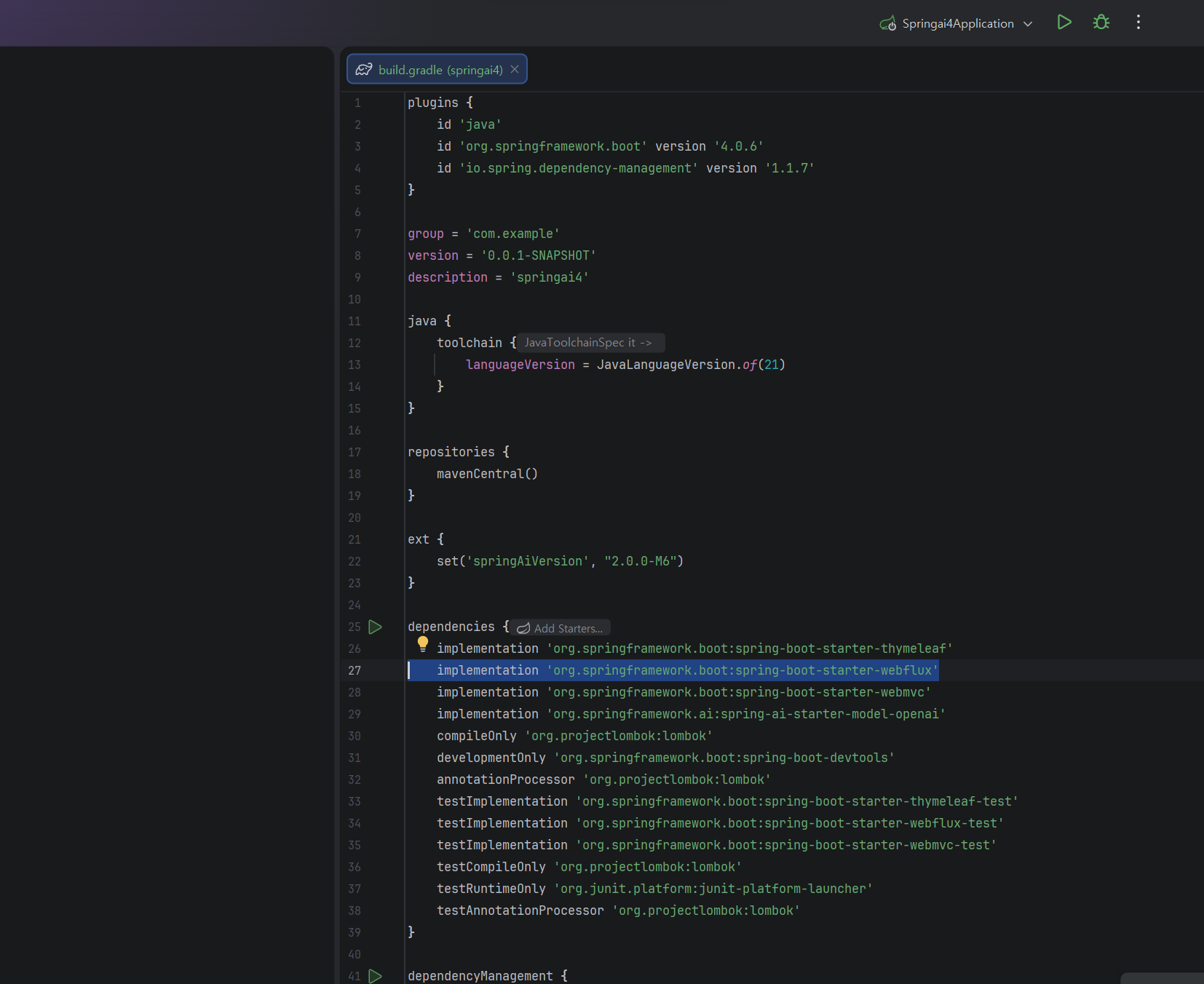
application.properties
수정 api키 입력
더보기
spring.application.name=springai4
spring.ai.openai.api-key=
resources 폴더 안에 prompt.txt 추가
더보기
You are a helpful AI assistant.
Answer questions clearly and concisely in Korean.
Be friendly and professional.
java 패키지 안에 service 패키지 추가
ChatService 클래스도 추가
더보기
package com.example.springai4.service;

import org.springframework.ai.chat.client.ChatClient;
import org.springframework.beans.factory.annotation.Value;
import org.springframework.core.io.Resource;
import org.springframework.stereotype.Service;
import reactor.core.publisher.Flux;

import java.io.IOException;
import java.nio.charset.StandardCharsets;

@Service
public class ChatService {
    private final ChatClient chatClient;
    @Value("classpath:prompt.txt") private Resource promptResource;

    public ChatService(ChatClient.Builder chatClientBuilder) {
        this.chatClient = chatClientBuilder.build();
    }

    public String syncChat(String userMessage) {
        String systemPrompt = "";
        try {
            //prompt.txt 내용을 UTF-8 문자열로 읽기
            systemPrompt = promptResource.getContentAsString(StandardCharsets.UTF_8);
        } catch (IOException e) {
            e.printStackTrace();
        }
        String s = chatClient.prompt()
                .system(systemPrompt)
                .user(userMessage)
                .call()
                .content();
        return s;
    }

    // Project Reactor 에서 제공하는 비동기 스트림 타입
    public Flux<String> streamChat(String userMessage) {
        try {
            //prompt.txt 내용을 UTD-8 문자열로 읽기
            String systemPrompt = promptResource.getContentAsString(StandardCharsets.UTF_8);
            // 스트리밍 방식 AI 호출
            Flux<String> f = chatClient.prompt()
                    .system(systemPrompt)
                    .user(userMessage)
                    .stream()
                    .content();
            // Flux<String>
            return f;
        } catch (IOException e) {
            // 예외 발생 시 Flux 에러 반환
            return Flux.error(e);
        }
    }
}
controller 패키지 생성
ChatControllert 클래스 생성
더보기
package com.example.springai4.controller;


import com.example.springai4.service.ChatService;
import org.springframework.stereotype.Controller;
import org.springframework.web.bind.annotation.GetMapping;
import org.springframework.web.bind.annotation.RequestParam;
import org.springframework.web.bind.annotation.ResponseBody;
import reactor.core.publisher.Flux;

@Controller
public class ChatController {
    private final ChatService chatService;
    public ChatController(ChatService chatService) {
        this.chatService = chatService;
    }

    @GetMapping("/syncchat")
    public String chatForm1() { return "syncchat"; } // syncchat 메서드 호출

    @GetMapping("/streamchat")
    public String chatForm2() { return "streamchat"; } // streamChat 메서드 호출

    // 응답을 할 수 있는 코드를 호출

    @GetMapping(value = "/api/chat/sync")
    @ResponseBody
    public String syncChat(@RequestParam String message) {
        return chatService.syncChat(message);
    }

    @GetMapping(value = "/api/chat/stream")
    @ResponseBody
    public Flux<String> streamChat(@RequestParam String message) {
        return chatService.streamChat(message);
    } // stream() 사용
}
chat.css
streamchat.html
syncchat.html 추가

실행해보면
http://localhost:8080/syncchat

http://localhost:8080/streamchat
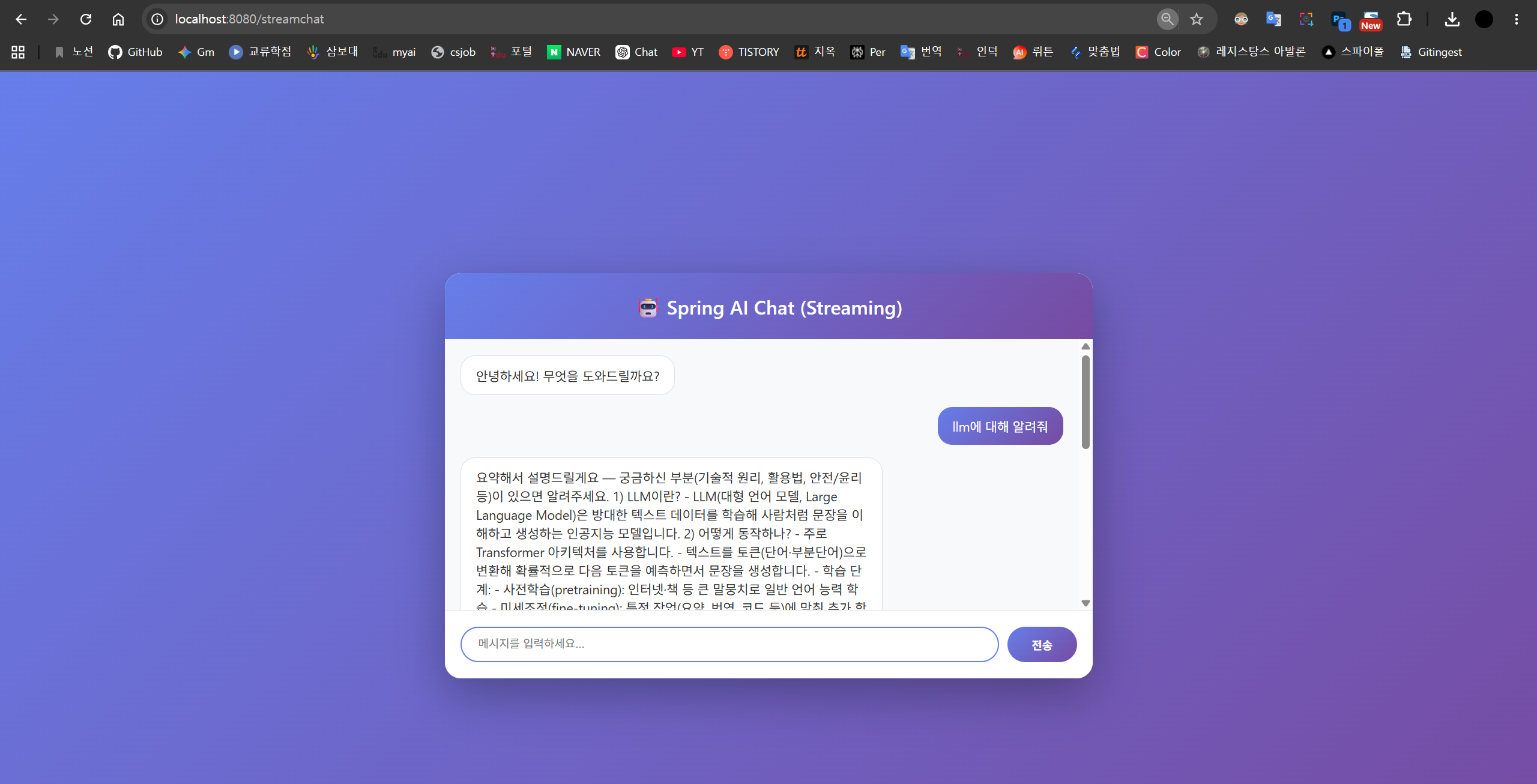
service 패키지 안에
ZeroShotFewShotService추가
더보기
package com.example.springai4.service;

import org.springframework.ai.chat.client.ChatClient;

public class ZeroShotFewShotService {
    private final ChatClient chatClient;

    public ZeroShotFewShotService(ChatClient.Builder chatClientBuilder) {
        this.chatClient = chatClientBuilder.build();
    }

    public String runZeroShot(String inputText) {
        System.out.println("---- 1. 제로샷 실행 -----");
        return chatClient.prompt()
                .user(inputText)
                .call()
                .content();
    }

    public String runFewShot(String inputText) {
        System.out.println("--- 2. 퓨샷 실행 ---");
        // context 정보 제공
        String userPrompt = """
                                질문에 대한 답은 다음과 같이 과정과 답으로 나눠서 작성해주세요.
                                10개의 공이 있었는데 3개를 가져가고 2개를 돌려받았다. 몇 개인가?
                                과정: (10-3)+2=9
                                답: 9개.

                                질문내용: %s """.formatted(inputText);
        return chatClient.prompt()
                .user(userPrompt)
                .call()
                .content();
    }
}
domain 패키지를 추가하고
Result 레코드를 추가
더보기
package com.example.springai4.domain;

public record Result(
        String type,
        String result
) {}
ChatController 수정
더보기
package com.example.springai4.controller;


import com.example.springai4.domain.Result;
import com.example.springai4.service.ChatService;
import com.example.springai4.service.ZeroShotFewShotService;
import org.springframework.stereotype.Controller;
import org.springframework.web.bind.annotation.GetMapping;
import org.springframework.web.bind.annotation.RequestParam;
import org.springframework.web.bind.annotation.ResponseBody;
import reactor.core.publisher.Flux;

import java.util.ArrayList;
import java.util.List;

@Controller
public class ChatController {
    private final ChatService chatService;
    private final ZeroShotFewShotService shotService;

    public ChatController(ChatService chatService,
                          ZeroShotFewShotService shotService) {
        this.chatService = chatService;
        this.shotService = shotService;
    }

    @GetMapping("/syncchat")
    public String chatForm1() { return "syncchat"; } // syncchat 메서드 호출

    @GetMapping("/streamchat")
    public String chatForm2() { return "streamchat"; } // streamChat 메서드 호출

    // 응답을 할 수 있는 코드를 호출

    @GetMapping(value = "/api/chat/sync")
    @ResponseBody
    public String syncChat(@RequestParam String message) {
        return chatService.syncChat(message);
    }

    @GetMapping(value = "/api/chat/stream")
    @ResponseBody
    public Flux<String> streamChat(@RequestParam String message) {
        return chatService.streamChat(message);
    } // stream() 사용

    @GetMapping("/compare")
    @ResponseBody
    public List<Result> comparePrompts() {
        String testInput = "5명이서 피자 8조각을 나누어 먹는데, 2명이 추가되면 피자 1인당 몇 조각을 먹게 될까";

        String zeroShotResult = shotService.runZeroShot(testInput);
        String fewShotResult = shotService.runZeroShot(testInput);
        List<Result> list = List.of(
                new Result("제로샷의 결과", zeroShotResult),
                new Result("퓨샷의 결과", fewShotResult)
        );
        return list;
    }
}
실행하면
http://localhost:8080/compare

'대우개발원 수업 내용 > spring기반 ai' 카테고리의 다른 글
| spring ai 10일차 / 다중 llm, springai5 (0) | 2026.05.20 |
|---|---|
| spring ai 9일차 / 다중 llm, springai5 (0) | 2026.05.19 |
| spring ai 5일차 / springaigroq groq, springai1 (0) | 2026.05.12 |
| spring ai 3,4일차 / springaigroq groq, springai1 (0) | 2026.05.11 |
| spring ai 2일차 / springaiollama (1) | 2026.05.07 |