2024. 10. 29. 13:33ㆍC++프로그래밍/수업 내용 및 수업 후 과제
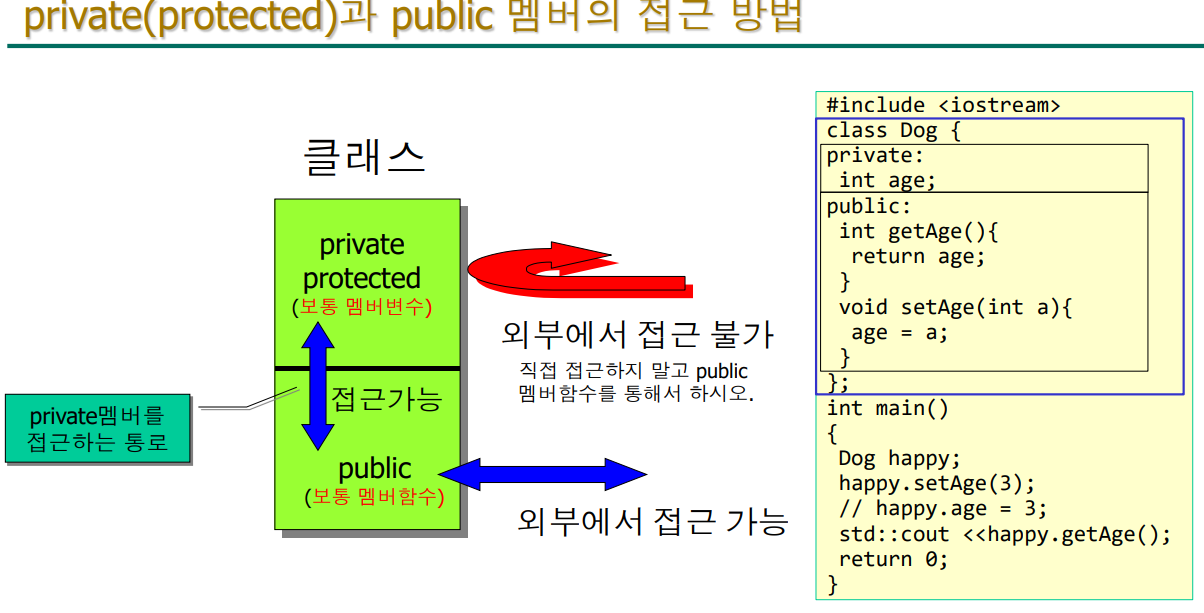
객체의 멤버 호출
- 직접참조연산자 : (.) 일반 객체가 멤버(변수/함수)에 접근하기 위해 사용
- 간접참조연산자 : (->) 포인터 객체가 멤버(변수/함수)에 접근하기 위해 사용
기말고사에 나올 수도 있음
#include <iostream> // 입출력 스트림을 사용하기 위한 헤더 파일
using namespace std; // 표준 네임스페이스 사용

class Dog { // 개 클래스를 정의
private:
	int age; // 개의 나이
	double weight; // 개의 몸무게
	string name; // 개의 이름
public:
	int getAge() { // 나이를 반환하는 함수
		return age; // 나이를 반환
	}
	void setAge(int a) { // 나이를 설정하는 함수
		age = a; // 매개변수 a를 age에 저장
	}
	double getWeight() { // 몸무게를 반환하는 함수
		return weight; // 몸무게를 반환
	}
	void setWeight(double w) { // 몸무게를 설정하는 함수
		weight = w; // 매개변수 w를 weight에 저장
	}
	string getName() { // 이름을 반환하는 함수
		return name; // 이름을 반환
	}
	void setName(string n) { // 이름을 설정하는 함수
		name = n; // 매개변수 n을 name에 저장
	}
};

int main() // 프로그램의 시작점
{
	Dog happy; // Dog 객체 happy 생성
	happy.setAge(3); // happy의 나이를 3으로 설정
	happy.setWeight(3.5); // happy의 몸무게를 3.5로 설정
	happy.setName("해피"); // happy의 이름을 "해피"로 설정
	cout << happy.getName() << "는 " // happy의 이름을 출력
		<< happy.getAge() << "살, " // happy의 나이를 출력
		<< happy.getWeight() << "kg입니다.\n"; // happy의 몸무게를 출력
	return 0; // 프로그램 종료
}
위의 소스의 단점을 보완한것 ↓
위의 Dog 클래스 소스 코드에는 몇 가지 개선할 수 있는 점이 있습니다. 아래는 보완된 코드

생성자 추가: 객체를 생성할 때 초기화할 수 있도록 생성자를 추가
유효성 검사: 나이와 몸무게에 대한 유효성 검사를 추가하여 잘못된 값을 방지
const 수정자: getter 메서드에 const를 추가하여 객체의 상태를 변경하지 않음을 명시
string 사용 시 std:: 명시: string을 사용할 때 std::를 명시하여 명확성을 높임

cpp


#include <iostream> // 입출력 스트림을 사용하기 위한 헤더 파일
#include <string>   // 문자열을 사용하기 위한 헤더 파일
using namespace std; // 표준 네임스페이스 사용

class Dog { // 개 클래스를 정의
private:
    int age; // 개의 나이
    double weight; // 개의 몸무게
    string name; // 개의 이름
public:
    // 생성자
    Dog(int a = 0, double w = 0.0, string n = "") : age(a), weight(w), name(n) {
        if (a < 0) age = 0; // 나이가 0 미만이면 0으로 설정
        if (w < 0) weight = 0.0; // 몸무게가 0 미만이면 0.0으로 설정
    }

    int getAge() const { // 나이를 반환하는 함수 (const)
        return age; // 나이를 반환
    }

    void setAge(int a) { // 나이를 설정하는 함수
        if (a >= 0) age = a; // 유효한 나이만 설정
    }

    double getWeight() const { // 몸무게를 반환하는 함수 (const)
        return weight; // 몸무게를 반환
    }

    void setWeight(double w) { // 몸무게를 설정하는 함수
        if (w >= 0) weight = w; // 유효한 몸무게만 설정
    }

    string getName() const { // 이름을 반환하는 함수 (const)
        return name; // 이름을 반환
    }

    void setName(const string& n) { // 이름을 설정하는 함수
        name = n; // 이름 설정
    }
};

int main() // 프로그램의 시작점
{
    Dog happy(3, 3.5, "해피"); // Dog 객체 happy 생성 및 초기화
    cout << happy.getName() << "는 " // happy의 이름을 출력
         << happy.getAge() << "살, " // happy의 나이를 출력
         << happy.getWeight() << "kg입니다.\n"; // happy의 몸무게를 출력
    return 0; // 프로그램 종료
}
문자열 복사 : string
#define _CRT_SECURE_NO_WARNINGS
#include <iostream>
int main(void)
{
std::string s1;
std::string s2 = "soft";
s1 = s2; //string형 복사는 그냥 대입
//strcpy(s1, s2);
std::cout << "s1=" << s1 << " s2=" << s2;
return 0;
}
결과 값
s1=soft s2=soft
char s[5] vs std::string s
- char 배열은 성능과 메모리 제어가 중요한 경우에 유용
버퍼 오버플로우같은 메모리 안전성에 취약
문자열 조작(복사, 연결 등) 기능이 없어서 수동으로 처리
- std::string은 안전하고 편리
메모리 할당과 해제를 자동으로 관리하므로 char배열에 비해 성능이 떨어짐
문자열의 길이도 저장하므로 메모리 사용량이 더 많음
C++에서 문자열 : const char* vs string

 const char*

#include <iostream>
using namespace std;
const char* vending(int x)
{
if (x == 1) return "커피";
else return "유자차";
}
int main()
{
cout<<vending(1);
return 0;
}

string

#include <iostream>
using namespace std;
string vending(int x)
{ //std::string
if (x == 1) return "커피";
else return "유자차";
}
int main()
{
cout << vending(1);
return 0;
}
실습 4-1: 고양이 클래스(2)
std::string사용


#define _CRT_SECURE_NO_WARNINGS
#include <iostream>
#include <string>
using namespace std;

class Cat {
private:
    int age; // 나이
    string name; // 이름
public:
    int getAge(); // 나이를 반환하는 메서드
    string getName(); // 이름을 반환하는 메서드
    void setAge(int a); // 나이를 설정하는 메서드
    void setName(const string& pName); // 이름을 설정하는 메서드
};

int Cat::getAge() {
    return age; // 나이를 반환
}

void Cat::setAge(int a) {
    age = a; // 나이 설정
}

void Cat::setName(const string& pName) { // const 참조로 매개변수 변경
    name = pName; // 이름 설정
}

string Cat::getName() {
    return name; // 이름 반환
}

int main() {
    Cat nabi; // Cat 객체 nabi 생성
    nabi.setName("나비"); // 이름 설정
    nabi.setAge(3); // 나이 설정
    cout << nabi.getName() << " 나이는 " // 이름 출력
         << nabi.getAge() << "살이다." << endl; // 나이 출력
    return 0; // 프로그램 종료
}
실습 4-2: 객체 배열

#include <iostream>
using std::cout;
class Dog {
private:
	int age;
public:
	int getAge() { return age; } //자동 inline함수
	void setAge(int a) { age = a; } //자동 inline함수
};
int main()
{
	int i;
	Dog dd[5]; //Dog클래스형 객체배열 dd, 강아지 5마리
	for (i = 0; i < 5; i++) {
		dd[i].setAge(i);
		cout << dd[i].getAge(); //01234
	}
	return 0;
}
생성자와 소멸자
생성자(constructor)와 소멸자 (destructor)라는 멤버함수는 사용자가 꼭 정의하지 않아도 되는 함수이다.
그렇다고 해서 존재하지 않는 것은 아니며 시스템 내부에서 언제나 객체의 생성과 소멸을 담당한다
사용자가 이를 좀더 유용하게 사용하고자 하는 경우에만 가시화시켜 클래스 내부에 선언, 정의한다
.
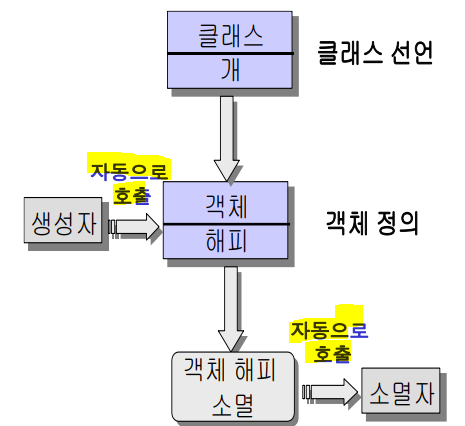
c++에서의 생성자와 소멸자에 대해 예를 들어 설명

생성자 (Constructor)
정의: 생성자는 클래스의 객체가 생성될 때 자동으로 호출되는 특수한 메서드입니다. 주로 객체의 초기화 작업을 수행합니다.

특징:

생성자의 이름은 클래스의 이름과 동일합니다.
반환형이 없습니다. 즉, void 또는 다른 자료형을 반환하지 않습니다.
매개변수를 가질 수 있으며, 이를 통해 객체 생성 시 초기값을 설정할 수 있습니다.
기본 생성자(매개변수가 없는 생성자)와 매개변수가 있는 생성자를 모두 정의할 수 있습니다.
용도:

객체의 속성을 초기화합니다.
자원(메모리, 파일 등)을 할당합니다.
생성 시 필요한 복잡한 초기화 작업을 수행합니다.
예시:
cpp


class Dog {
private:
    int age;
    string name;
public:
    Dog(int a, string n) : age(a), name(n) { // 생성자
        // 초기화 작업
    }
};
소멸자 (Destructor)
정의: 소멸자는 객체가 소멸될 때 자동으로 호출되는 특수한 메서드입니다.
주로 객체가 사용한 자원을 해제하는 작업을 수행합니다.

특징:

소멸자의 이름은 클래스 이름 앞에 물음표(~)를 붙입니다.
반환형이 없으며, 매개변수를 가질 수 없습니다.
객체의 소멸 시점에 호출되며, 수동으로 호출할 수 없습니다.
용도:

동적으로 할당한 메모리를 해제합니다.
파일 핸들, 네트워크 연결 등 외부 자원을 정리합니다.
객체의 수명 동안 발생한 리소스를 안전하게 정리합니다.
예시:
cpp


class Dog {
private:
    int age;
    string name;
public:
    Dog(int a, string n) : age(a), name(n) { } // 생성자
    ~Dog() { // 소멸자
        // 자원 해제 작업
    }
};
초기화
변수의 초기화
int num=5;
char ch='A';
double avg=0.0;
int *pnum=#
char *name="Han";
배열의 초기화
int sd[3]={1,2,3};
char name[4]={'H','a','n','\0'};
구조체 변수(객체)의 초기화
struct SCORE{
char name[15];
int kor;
};
struct SCORE h={"하니",90};
Dog클래스의 객체 초기화?맴버 변수 초기화
#include <iostream>
using std::cout;
class Dog {
private:
int age = 1; //C++11부터 가능
public:
int getAge();
void setAge(int a);
// Dog 클래스에는 생성자가 없음
// Dog(){}같은 생성자를 자동으로 만들어 줌
// 이를 implicitly generated constructor라 함
// 묵시적(자동)으로 만들어지는 생성자
};
int Dog::getAge()
{
return age;
}
void Dog::setAge(int a)
{
age = a;
}
int main()
{
Dog happy, coco;
cout << happy.getAge() << coco.getAge();
return 0;
} 생성자의 특징
- 생성자의 이름은 클래스명과 같다.
클래스명이 Dog라면 생성자 이름은 Dog()
- 클래스의 객체가 생성될 때마다 자동으로 호출된다.
- 보통 객체가 메모리에 할당될 때 멤버변수의 초기화를 담당한다.
- 리턴형을 쓰지 않는다.
리턴값이 존재하지 않으며 void형을 지정해도 안된다.
C/C++언어에서는 리턴값을 생략하면 int형인데 생성자는 예외이다.
- 생성되는 객체마다 초기화 값이 다를 수 있으므로 하나의 클래스에 여러 개의 생성자가 존재할 수 있다.
매개변수는 달라야한다. (함수 중첩(overloading)에서 자세히 설명함)
- 객체가 생기면서 자동 호출되며, 사용자가 호출할 수는 없다.
- 생성자가 반드시 있어야 하는 것은 아니지만 메모리를 초기화 한다는 의미에서 있는 것이 좋다.
실습 4-5: private멤버변수를 특정 값으로 초기화하는 생성자
#include <iostream>
using std::cout;
class Dog{
private:
int age;
public:


Dog(); // 생성자 선언

Dog() {age =1;} // 생성자 정의 1번째 방법

Dog():age(1){} // 생성자 정의 2번째 방법

Dog():age{1}{} // 생성자를 정의 3번째 방법


int getAge();
void setAge(int a);
};
Dog::Dog() // 생성자 정의, 리턴형을 쓰면 안됨
{
age=1; // private멤버변수 Age를 초기화
}
int Dog::getAge()
{ return age; }
void Dog::setAge(int a)
{ age=a; }
int main()
{
Dog happy; //happy객체가 생성되는 순간 생성자가 자동 호출됨
cout<<happy.getAge();
return 0;
}
Dog() {age =1;} // 생성자 정의 1번째 방법
Dog():age(1){} // 생성자 정의 2번째 방법
Dog():age{1}{} // 생성자를 정의 3번째 방법
중요 ↑
기말고사에서 항상 내는 문제
C++에서 변수를 초기화하는 방법

#include <iostream>
int main()
{
int x=1; //copy initialization(복사초기화),비추
int y(2);//direct initialization(직접 초기화)
int z{3};//Uniform initialization(유니폼 초기화), C++11
int z1{};//Uniform initialization, 자동으로 0,C++11
std::cout << x << y << z << z1;
}
C++에서 변수를 초기화하는 방법 최종 정리
- int a=10; // C에서도 쓰이는 일반적인 방법, 복사 초기화
- int a(10); //C++에서 추천하는 방법, 직접 초기화
- int a{10}; //유니폼 초기화
- 클래스의 멤버변수를 초기화하는 방법
Dog::Dog() {age=1;}
Dog::Dog():age(1){}
Dog::Dog():age(1),species("진돗개"),addr("서울시"){}
실습 4-6: 생성자의 매개변수로 멤버변수 초기화
기말고사 잘 냈던 문제

#include <iostream>
using std::cout;
class Dog {
private:
int age;
public:
Dog(int a) { // 1번
age = a;
}
int getAge() { return age; }
void setAge(int a) { age = a; }
};
int main()
{
Dog coco(4); //4는 생성자로 넘어감
Dog coco1{3};//Uniform initialization
Dog coco2 = Dog(2); //비추
Dog coco3 = 1; //비추
cout<<coco.getAge()<<coco1.getAge()<<coco2.getAge()<<coco3.getAge();
return 0;
}

#include <iostream>
using std::cout;
class Dog {
private:
int age;
public:
Dog(int a):age(a){} //initializer list 2번
// Dog(int a):age{a}{} // 3번
int getAge() { return age; }
void setAge(int a) { age = a; }
};
int main()
{
Dog coco(4); //4는 생성자로 넘어감
Dog coco1{3};//Uniform initialization
Dog coco2 = Dog(2); //비추
Dog coco3 = 1; //비추
cout<<coco.getAge()<<coco1.getAge()<<coco2.getAge()<<coco3.getAge();
return 0;
}
소멸자 (destructor)
- 클래스의 객체가 소멸될 때 자동으로 호출된다.
- 소멸자의 이름은 클래스명과 같고, 앞에 ~(tilde)를 붙인다.
- 클래스명이 Dog라면 소멸자 이름은 ~Dog()
- 하나의 클래스에 유일하다.
생성자는 중첩이 가능하지만 소멸자 중첩은 불가능하다.
- 리턴형과 매개변수가 없다.
리턴값이 존재하지 않으며 void형을 지정해도 안된다.
~Dog();
- 사용자가 직접 호출할 수는 없다.
실습 4-7: 객체가 소멸되면서 "소멸"이라고 출력되는 소멸자

#include <iostream>
using std::cout;
class Dog {
private:
	int age;
public:
	Dog(int a) { age = a; cout << "멍\n"; }
	~Dog() { cout << "소멸\n"; }
	// 소멸자 정의
	int getAge();
	void setAge(int a);
};
int Dog::getAge()
{
	return age;
}
void Dog::setAge(int a)
{
	age = a;
}
int main()
{
	Dog happy(5); // 생성자 호출
	cout << "main함수 시작\n";
	cout << happy.getAge();
	cout << "\nmain함수 끝\n";
	return 0;
} // 소멸자 호출


결과
멍
main함수 시작
5
main함수 끝
소멸
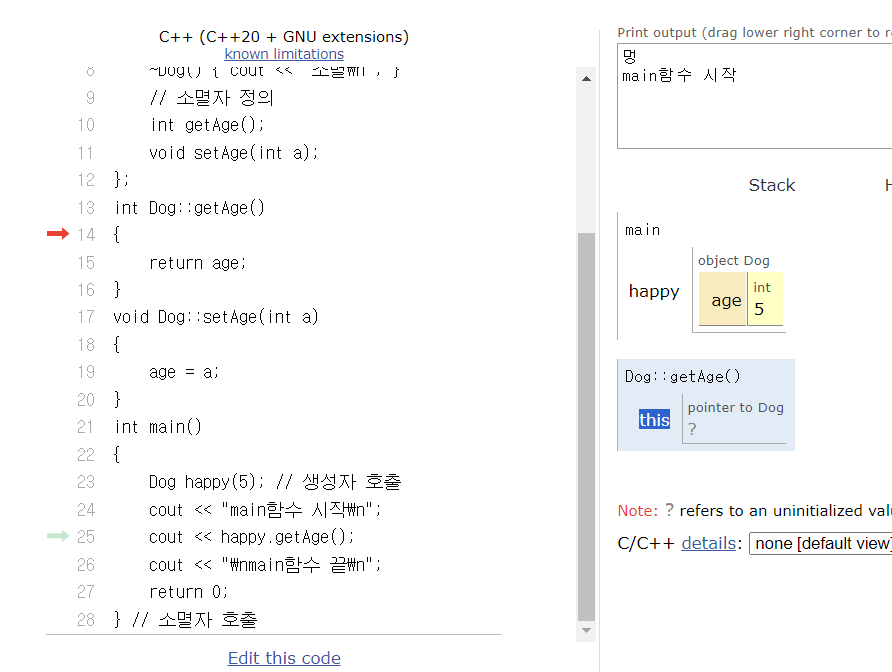
this 포인터
this 포인터는 자동적으로 시스템이 만들어 주는 포인터
멤버가 호출될 때 그 멤버가 속한 객체를 가르킨다.
객체를 통하여 멤버를 호출할 때 컴파일러는 객체의 포인터 즉 주소를 this포인터에 넣은
다음 멤버를 호출한다.
this 포인터는 멤버를 호출한 객체의 const 포인터이다.
멤버함수를 수행하고 나서 그 결과로 객체 자신을 되돌릴 경우 return *this라고 하면 된다.
멤버함수에서 볼 때 this 포인터는 어떤 객체가 자신을 호출했는지 알고자 하는 경우 사용한다.
연산자 중첩에서 사용
클래스의 멤버함수 내에서 다른 클래스에 자기 자신을 매개변수로 넘길 때 사용
실습 4-8: this 포인터 예 1 수정1단계

#include <iostream>
using std::cout;
class Dog{
private:
int age;
public:
Dog(int age){ age=a;}
~Dog(){cout<<"소멸";}
int getAge();
void setAge(int a);
};
int Dog::getAge(){return age;}
void Dog::setAge(int age){age = a;} //멤버변수age=매개변수age
int main()
{
Dog happy(5);
cout<<happy.getAge();
return 0;
}
//실습 4-8: this 포인터 예 1 수정1단계
// this 사용 x
#include <iostream>
using std::cout;
class Dog{
private:
int age;
public:
Dog(int age){ age=a;}
~Dog(){cout<<"소멸";}
int getAge();
void setAge(int a);
};
int Dog::getAge(){return age;}
void Dog::setAge(int age){age = a;} //멤버변수age=매개변수age
int main()
{
Dog happy(5);
cout<<happy.getAge();
return 0;
}
//실습 4 - 8: this 포인터 예 1 수정 2단계
// this 포인터 사용
#include <iostream>
using std::cout;
class Dog {
private:
int age;
public:
Dog(int age) { this -> age = age; }
~Dog() { cout << "소멸"; }
int getAge();
void setAge(int a);
};
int Dog::getAge() { return age; }
void Dog::setAge(int age) { this -> age = age; } //멤버변수age=매개변수age
int main()
{
Dog happy(5);
cout << happy.getAge();
return 0;
}//작년 기말고사 문제 1단계
#include <iostream>
using std::cout;
class cat {
private:
int age;
public:
int getAge() {return age;}
void setAge(int a) {age = a;}
};
int main()
{
cat ya;
ya.setAge(1);
cout << ya.getAge();
return 0;
}//작년 기말고사 문제 2단계 생성자 만듬
#include <iostream>
using std::cout;
class Cat {
private:
int age;
public:
Cat() { age = 1; }
int getAge() {return age;}
void setAge(int a) {age = a;}
};
int main()
{
Cat ya;
cout << ya.getAge() << std::endl;
ya.setAge(2);
cout << ya.getAge() << std::endl;
return 0;
}//작년 기말고사 문제 3단계 소멸자
#include <iostream>
using std::cout;
class Cat {
private:
int age;
public:
Cat() { age = 1; }
~Cat() { cout << "야옹~~ \n"; }
int getAge() {return age;}
void setAge(int a) {age = a;}
};
int main()
{
Cat ya;
cout << ya.getAge() << std::endl;
ya.setAge(2);
cout << ya.getAge() << std::endl;
return 0;
}//작년 기말고사 문제 4단계
#include <iostream>
using std::cout;
class Cat {
private:
int age;
public:
Cat(int a) { age = a; }
~Cat() { cout << "야옹~~ \n"; }
int getAge() {return age;}
void setAge(int a) {age = a;}
};
int main()
{
Cat ya(1);
cout << ya.getAge() << std::endl;
ya.setAge(2);
cout << ya.getAge() << std::endl;
return 0;
}//작년 기말고사 문제 5단계 this 포인터 사용
#include <iostream>
using std::cout;
class Cat {
private:
int age;
public:
Cat(int age) {this -> age = age; }
~Cat() { cout << "야옹~~ \n"; }
int getAge() {return age;}
void setAge(int age) {this -> age = age;}
};
int main()
{
Cat ya(1);
cout << ya.getAge() << std::endl;
ya.setAge(2);
cout << ya.getAge() << std::endl;
return 0;
}//작년 기말고사 문제 6단계 이름
#include <iostream>
using std::cout;
class Cat {
private:
int age;
std::string name;
public:
Cat(int age) {this -> age = age; }
~Cat() { cout << "야옹~~ \n"; }
int getAge() {return age;}
void setAge(int age) {this -> age = age;}
std::string getName() { return name; }
void setName(std::string name) { this->name = name; }
};
int main()
{
Cat ya(1);
cout << ya.getAge() << std::endl;
ya.setAge(2);
cout << ya.getAge() << std::endl;
return 0;
}//작년 기말고사 문제 6단계 이름
#include <iostream>
using std::cout;
class Cat {
private:
int age;
std::string name;
public:
Cat(std::string name, int age) {
this->name = name;
this->age = age;
}
~Cat() { cout << "야옹~~ \n"; }
int getAge() {return age;}
void setAge(int age) {this -> age = age;}
std::string getName() { return name; }
void setName(std::string name) { this->name = name; }
};
int main()
{
Cat ya("야옹이", 1);
cout << ya.getName() << ya.getAge() << std::endl;
ya.setAge(2);
cout << ya.getAge() << std::endl;
return 0;
}'C++프로그래밍 > 수업 내용 및 수업 후 과제' 카테고리의 다른 글
| C++ 수업내용 및 수업 후 과제 (0) | 2024.11.12 |
|---|---|
| c++ 수업 내용 및 수업 후 과제 (3) | 2024.11.05 |
| C++ 7주차 수업 내용 및 수업 후 과제 (0) | 2024.10.15 |
| c++ 5주차 비대면 수업 (0) | 2024.10.07 |
| c++ 프로그래밍 4주차 수업 내용 및 수업 후 과제 (0) | 2024.09.24 |