spring airag 2일차 / Rag, springairag1,springairag2
2026. 5. 24. 21:01ㆍ대우개발원 수업 내용/spring기반 ai
반응형
2026-05-22
호텔에 대한 정보를 텍스트 파일로 가져와서
텍스트를 읽고 모델에게 학습시키는것
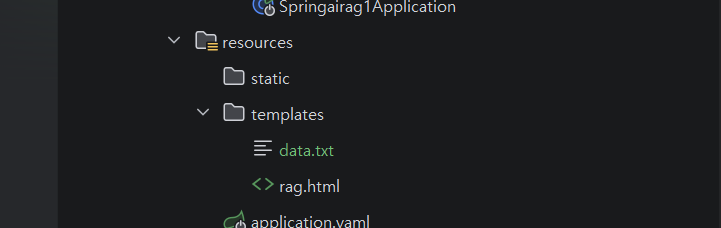
data.txt파일을 templates폴더에 넣기
더보기
1. 손님 맞이:손님이 호텔에 도착하면 친절한 미소와 함께 예의 바르고 활기찬 인사말을 건네야 합니다. 예를 들어, 'LuxeStay Hotel에 오신 것을 환영합니다!'라고 인사하며 고객의 이름을 알고 있을 경우 '어서 오세요, [고객 이름]님!'이라는 개인화된 인사말을 사용합니다. 고객이 처음 방문인지 재방문인지 확인하고, 재방문 고객에게는 특별한 감사 인사를 전달하여 만족도를 높입니다.
2. 체크인과 체크아웃:체크인 시간은 오후 3시, 체크아웃 시간은 오전 11시입니다. 고객이 이른 체크인이나 늦은 체크아웃을 요청할 경우, 객실 공실 상태를 확인한 후 가능 여부를 안내합니다. 불가능한 경우, 짐을 무료로 보관하는 서비스를 제공합니다. 고객에게 체크아웃 연장 시 발생할 수 있는 추가 요금에 대해 사전 안내하는 것이 중요합니다.
3. Wi-Fi 및 주차장 안내:LuxeStay Hotel의 모든 객실에는 무료 Wi-Fi가 제공됩니다. 고객에게 Wi-Fi 이름과 비밀번호를 명확히 안내하고, 연결에 문제가 발생할 경우 간단한 문제 해결 방법을 제공해야 합니다. 또한, 호텔은 200대 차량을 수용할 수 있는 무료 주차장을 제공합니다. 주차장의 위치와 개방 시간(24시간 운영)을 정확히 안내합니다.
4. 배리어 프리 대응:유니버설 룸은 휠체어를 사용하는 고객을 위해 설계되었습니다. 객실 내 샤워 체어, 높이 조절 침대 등의 시설을 확인하여 필요에 따라 설명합니다. 또한, 엘리베이터 위치, 장애인 전용 화장실, 경사로 등 호텔 내 편의시설을 숙지하고 고객에게 필요한 경우 도움을 제공합니다. 휠체어 대여 서비스도 준비되어 있습니다.
5. 반려동물 대응:LuxeStay Hotel은 반려동물 동반이 불가능합니다. 반려동물을 동반한 고객에게는 정중하게 정책을 안내하고, 인근 반려동물 호텔 정보를 제공합니다. 반려동물 호텔의 최신 정보는 프런트 데스크에서 항상 유지 관리해야 합니다.
6. 룸 서비스:룸 서비스는 매일 오전 7시부터 오후 11시까지 운영됩니다. 룸 서비스 메뉴를 숙지하고, 음식 알레르기나 특별 식단 요구사항에 대해 고객이 문의할 경우 주방과 협력하여 대응합니다. 고객이 메뉴에 없는 특별 요청을 할 경우, 가능한 대체 메뉴를 제안하거나 정중히 안내합니다.
7. 금연 정책 및 흡연실 안내:LuxeStay Hotel의 모든 객실은 금연입니다. 흡연을 원하는 고객에게는 1층 흡연실을 안내하며, 흡연실의 위치와 운영 시간(24시간 이용 가능)을 명확히 설명합니다. 객실 내 흡연 적발 시 청소 비용(30,000원)이 부과될 수 있음을 사전에 공지합니다.
8. 취소 정책:취소 수수료 정책은 다음과 같습니다.- 전날 취소: 숙박 요금의 30%  - 당일 취소: 숙박 요금의 50%  - 연락 없이 취소: 숙박 요금의 100%  이 정책은 모든 예약에 적용되며, 예약 시 고객에게 명확히 고지해야 합니다. 특별한 사정이 있는 고객에게는 관리자의 승인을 받아 유연하게 대응합니다.
9. 결제 방법:체크아웃 시 현금, 신용카드, 직불카드를 통해 결제가 가능합니다. 인터넷 예약 고객은 예약 시 카드 결제를 선택할 수 있습니다. 환불 요청이 있을 경우 취소 수수료를 공제한 뒤 환불 절차를 진행하며, 카드 환불은 처리 시간이 3~5일 소요될 수 있음을 안내합니다.
10. 고객 불만 처리:고객 불만은 신속히 접수하고, 상급자와 협력하여 해결 방안을 제공합니다. 문제 상황에 대한 명확한 설명과 사과를 전하며, 고객이 만족할 수 있는 해결책을 제시합니다. 불만 처리 후에는 고객에게 후속 조치를 안내하고, 문제가 재발하지 않도록 내부 프로세스를 개선합니다.
11. 긴급 상황 대응:화재 발생 시 고객을 안전하게 대피시키는 것이 최우선입니다. 대피 경로와 소화기 위치를 숙지하고, 침착하게 고객을 안내합니다. 응급 의료 상황에서는 지역 병원의 응급실 연락처를 제공하고, 요청 시 119 응급차를 호출합니다.
12. 관광 정보 및 액티비티 지원:고객에게 주변 관광지, 레스토랑, 쇼핑몰 정보를 제공하며 요청 시 지도나 예약 서비스를 지원합니다. LuxeStay Hotel에서는 지역 투어 패키지를 예약할 수 있는 서비스도 운영하고 있습니다.
두개의 프로젝트를 하나의 파일에서 하려고 하기때문에 새로운 controller, config 클래스를 추가해야함
HotelLoader 클래스 config패키지 안에 추가
더보기
package com.example.springairag1.config;

import jakarta.annotation.PostConstruct;
import org.springframework.ai.transformer.splitter.TextSplitter;
import org.springframework.ai.transformer.splitter.TokenTextSplitter;
import org.springframework.ai.vectorstore.VectorStore;
import org.springframework.beans.factory.annotation.Value;
import org.springframework.context.annotation.Configuration;
import org.springframework.core.io.Resource;
import org.springframework.jdbc.core.simple.JdbcClient;

import org.springframework.ai.document.Document;
import java.nio.file.Files;
import java.util.List;
import java.util.stream.Collectors;

@Configuration
public class HotelLoader {
    private final VectorStore vectorStore;
    private final JdbcClient jdbcClient;
    @Value("classpath:data.txt") private Resource resource;

    public HotelLoader(VectorStore vectorStore, JdbcClient jdbcClient) {
        this.vectorStore = vectorStore;
        this.jdbcClient = jdbcClient;
    }

    @PostConstruct
    public void init() throws Exception {
        Integer count=jdbcClient.sql("select count(*) from hotel_vector")
                .query(Integer.class)
                .single();
        System.out.println("No of Records in the MariaDB vector store="+count);
        if (count==0) {
            List<Document> documents = Files.lines(resource.getFile().toPath())
                    .map(Document::new)
                    .collect(Collectors.toList());
            TextSplitter textSplitter = new TokenTextSplitter();
            for (Document document : documents) {
                List<Document> splitteddocs = textSplitter.split(document);
                System.out.println("before adding document:"+ document.getFormattedContent());
                vectorStore.add(splitteddocs); //임베딩
                System.out.println("Added document:"+document.getFormattedContent());
                Thread.sleep(1000); //1초
            }
            System.out.println("Application is ready to Serve the Request");

        }
    }
}
data Sources 추가
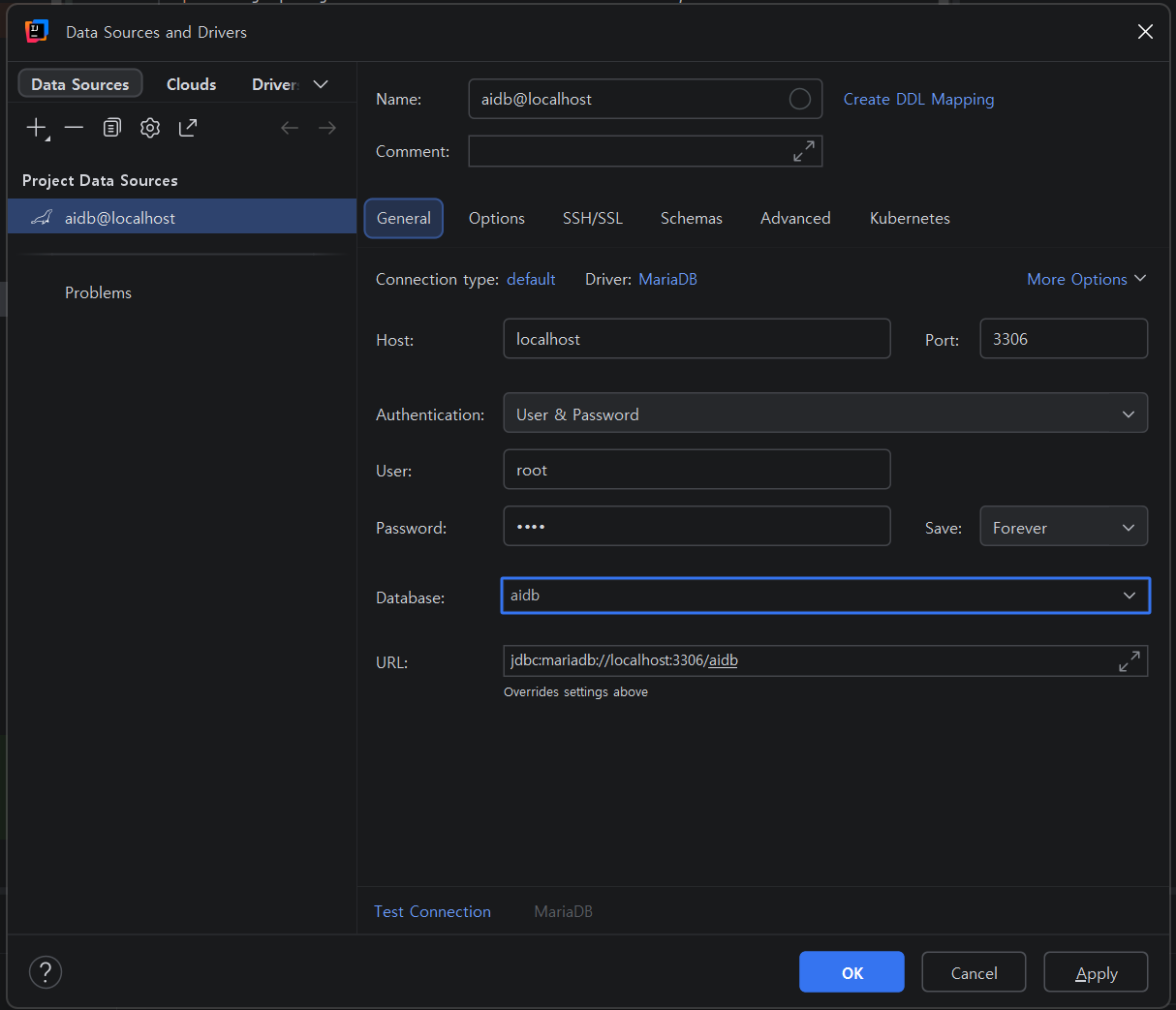
console창에 아래 sql 구문 추가
더보기
CREATE TABLE hotel_vector (
                              id VARCHAR(255) PRIMARY KEY,
                              content TEXT,
                              metadata JSON,
                              embedding VECTOR(1536)
);
hotel_vector 테이블 생성된 것 확인
HotelController 클래스 생성
더보기
package com.example.springairag1.controller;

import org.springframework.ai.chat.client.ChatClient;
import org.springframework.ai.document.Document;
import org.springframework.ai.vectorstore.SearchRequest;
import org.springframework.ai.vectorstore.VectorStore;
import org.springframework.ui.Model;
import org.springframework.web.bind.annotation.GetMapping;
import org.springframework.web.bind.annotation.RequestParam;
import org.springframework.web.bind.annotation.RestController;
import reactor.core.publisher.Flux;

import java.util.List;

@RestController
public class HotelController {
    private final VectorStore vectorStore;
    private final ChatClient chatClient;

    public HotelController(VectorStore vectorStore, ChatClient.Builder chatClient) {
        this.vectorStore = vectorStore;
        this.chatClient = chatClient.build();
    }

    @GetMapping("/question")
    public Flux<String> recommendMovies1(@RequestParam("question") String question, Model model) throws Exception {
        System.out.println(question);
        //Fetch similar movies using vector store
        List<Document> results = vectorStore.similaritySearch(SearchRequest.builder()
                                            .query(question)
                                            .similarityThreshold(0.5)
                                            .topK(1)
                                            .build());
        System.out.println(results);
        String template = """
                당신은 어느 호텔 직원입니다. 문맥에 따라 고객의 질문에 정중하게 답변해 주십시오.
                컨텍스트가 질문에 대답할 수 없는 경우 '모르겠습니다'라고 대답하세요.

                컨텍스트:
                {context}
                 질문:
                 {question}


                 답변:
                """;
        return chatClient.prompt()
                .user(promptUserSpec -> promptUserSpec.text(template)
                        .param("context", results)
                        .param("question", question))
                        .stream()
                        .content();

    }

}
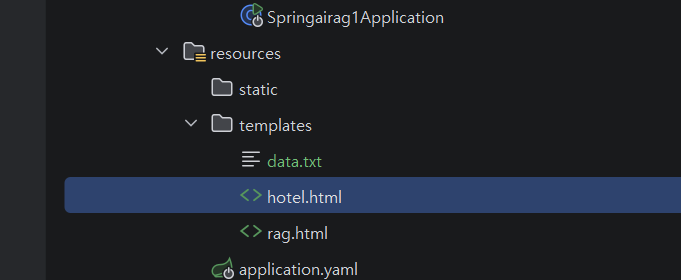
hotel.html을
templates 폴더에 추가
더보기
<!DOCTYPE html>
<html lang="en" xmlns:th="http://www.thymeleaf.org">
<head>
    <meta charset="UTF-8">
    <meta name="viewport" content="width=device-width, initial-scale=1.0">
    <title>Chatbot</title>
    <link href="https://maxcdn.bootstrapcdn.com/bootstrap/4.5.2/css/bootstrap.min.css" rel="stylesheet">
    <style>
        .chat-box {
            max-height: 500px;
            overflow-y: auto;
        }
        .message {
            margin-bottom: 10px;
        }
        .message .sender {
            font-weight: bold;
        }
        .message .content {
            white-space: pre-wrap;
            word-wrap: break-word;
        }
    </style>
</head>
<body>
<div class="container mt-5">
    <h1 class="text-center mb-4">RAG기반 호텔 AI 챗봇 서비스</h1>
    호텔 챗봇은 고객의 질문에 답변하거나 필요한 정보를 제공하는 AI 기반 서비스입니다.
    <!-- Chat Messages -->
    <div class="chat-box border rounded p-3 mb-3 bg-light" id="chatBox">
        <!-- Messages will be appended here -->
    </div>

    <!-- Chat Input -->
    <form id="chatForm" class="form-inline">
        <div class="form-group flex-fill">
            <input type="text" id="messageInput" class="form-control w-100" placeholder="Type your message..." required>
        </div>
        <button type="submit" class="btn btn-primary ml-2">Send</button>
    </form>
</div>

<script>
    const chatBox = document.getElementById('chatBox');
    const chatForm = document.getElementById('chatForm');
    const messageInput = document.getElementById('messageInput');

    chatForm.addEventListener('submit', async function(e) {
        e.preventDefault();
        const userMessage = messageInput.value.trim();
        if (!userMessage) return;

        // Add user message to chat
        appendMessage('User', userMessage);

        // Clear input field
        messageInput.value = '';

        try {
            // Fetch streaming response
            const response = await fetch(`/question?question=${encodeURIComponent(userMessage)}`);
            // 스트리밍 방식으로 응답부분
            const reader = response.body.getReader();
            let botMessageElement = appendMessage('Bot', ''); // Add empty bot message
            let contentElement = botMessageElement.querySelector('.content');
            await processStream(reader, contentElement);
        } catch (error) {
            console.error('Error:', error);
            appendMessage('System', 'An error occurred. Please try again.');
        }
    });

    function appendMessage(sender, content) {
        const messageElement = document.createElement('div');
        messageElement.className = 'message';
        messageElement.innerHTML = `
            <div class="sender ${sender === 'User' ? 'text-primary' : 'text-success'}">${sender}:</div>
            <div class="content">${content}</div>
        `;
        chatBox.appendChild(messageElement);
        chatBox.scrollTop = chatBox.scrollHeight;
        return messageElement;
    }

    async function processStream(reader, contentElement) {
        const decoder = new TextDecoder('utf-8');
        try {
            while (true) {
                const { done, value } = await reader.read();
                if (done) break;
                contentElement.innerHTML += decoder.decode(value, { stream: true });
                chatBox.scrollTop = chatBox.scrollHeight;
            }
        } catch (error) {
            console.error('Error processing stream:', error);
            contentElement.innerHTML += '<br><span class="text-danger">[Stream interrupted]</span>';
        }
    }
</script>
<script src="https://code.jquery.com/jquery-3.5.1.slim.min.js"></script>
<script src="https://cdn.jsdelivr.net/npm/@popperjs/core@2.5.3/dist/umd/popper.min.js"></script>
<script src="https://maxcdn.bootstrapcdn.com/bootstrap/4.5.2/js/bootstrap.min.js"></script>
</body>
</html>
springairag2
프로젝트 생성
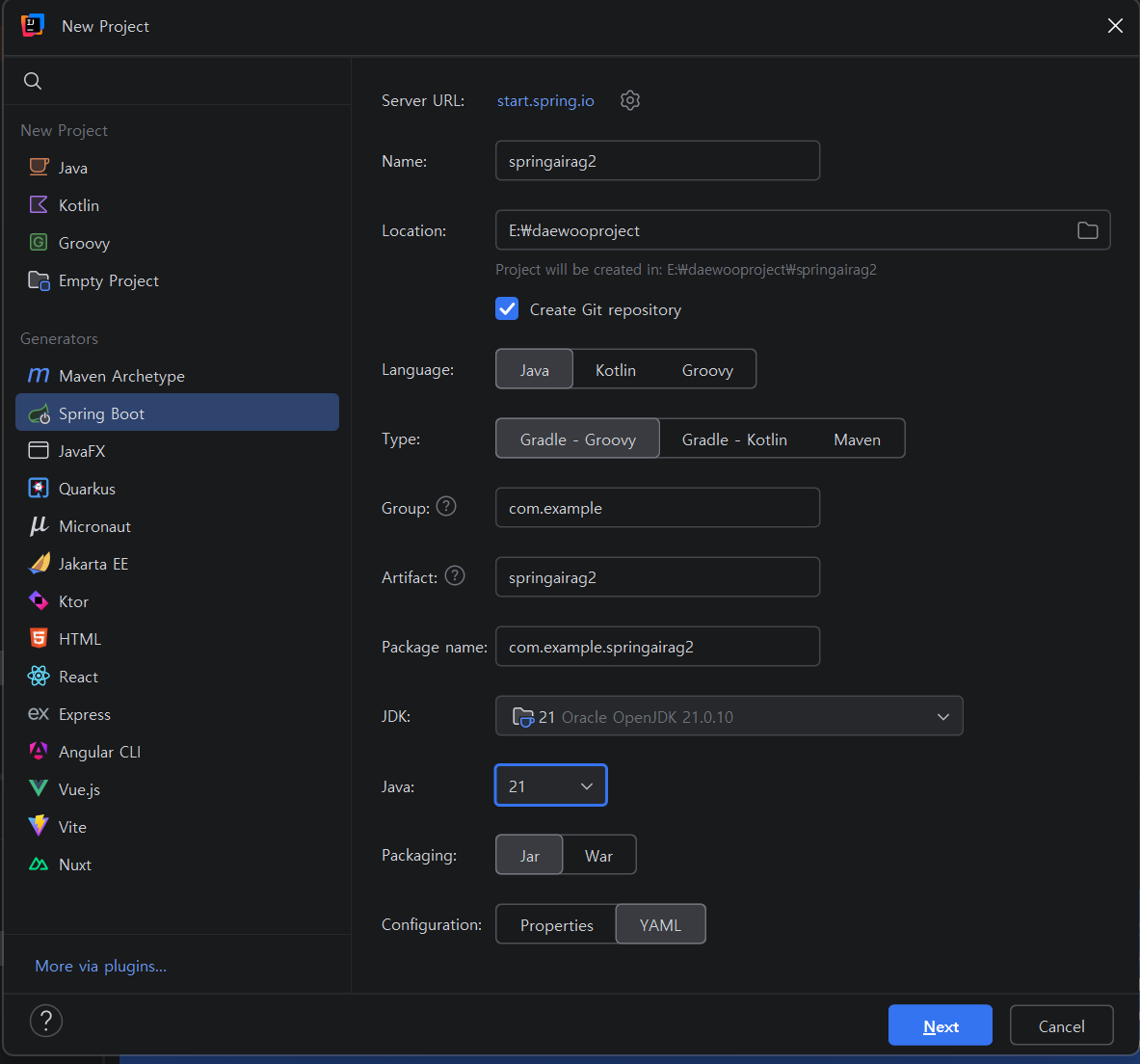
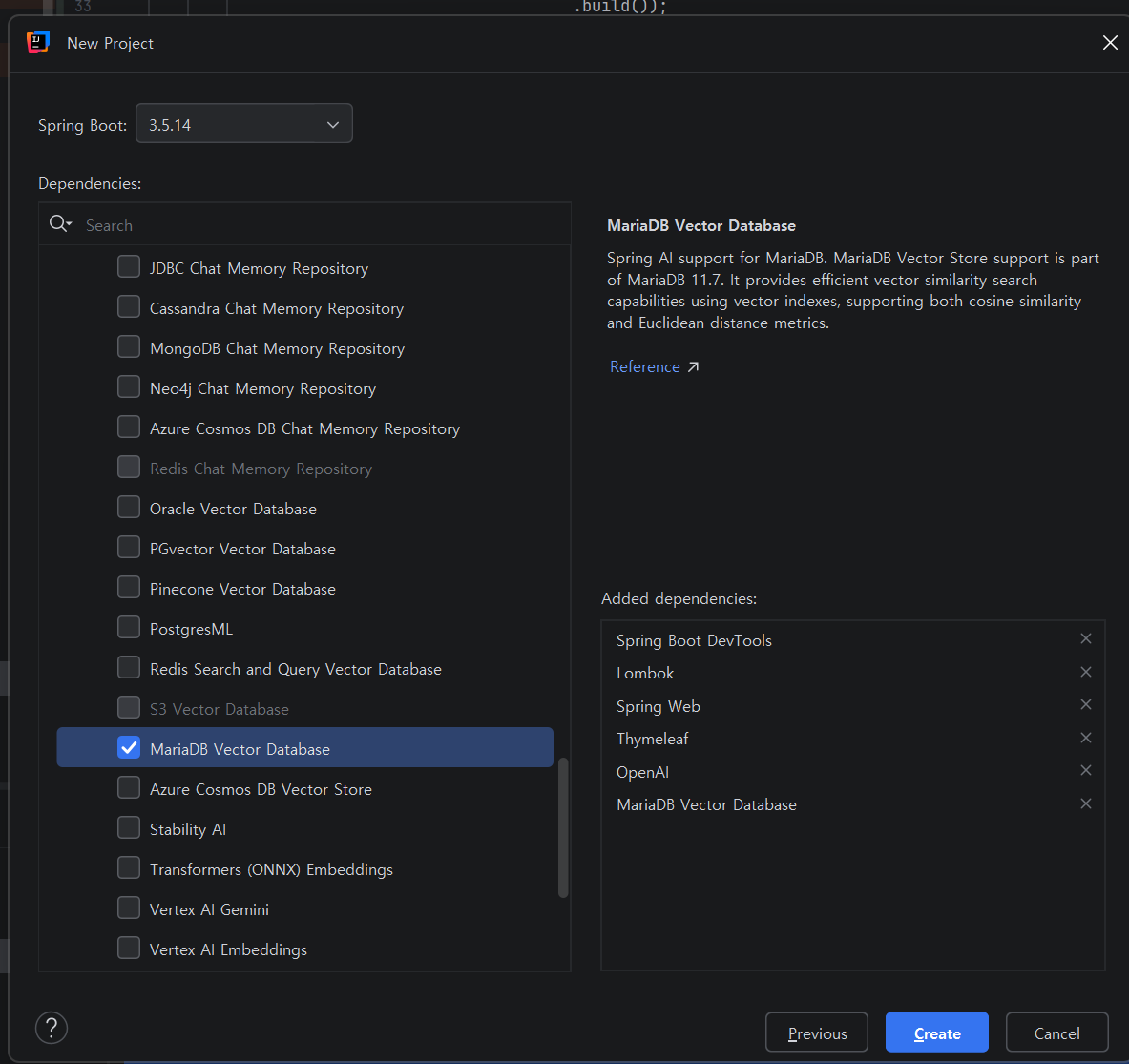
application.yaml 코드 수정
dto 패키지를 만들고 3개의 클래스 추가
AskRequest 클래스 생성
더보기
package com.example.springairag2.dto;

import lombok.Getter;

// --------RAG 질문 요청-------------------------------
@Getter
public class AskRequest {
    private String question;
    private String category; // null이면 전체 검색, 값이 있으면 해당 카테고리만 검색
}
AskResponse
더보기
package com.example.springairag2.dto;

import lombok.Builder;
import lombok.Getter;

import java.util.List;
// --------RAG 질문 응답-------------------------------
@Getter
@Builder
public class AskResponse {
    private String question;
    private String answer;
    private List<SourceDoc> sources; // 답변 근거 문서 목록

    @Getter
    @Builder
    public static class SourceDoc {
        private String content;
        private String category;
        private String source;
        private double score;  // 유사도 점수
    }
}
SaveRequest
더보기
package com.example.springairag2.dto;

import lombok.Getter;
import lombok.Setter;
// --------문서 저장 요청-------------------------------
@Getter@Setter
public class SaveRequest {
    private String content;
    private String category; // 예: HR, 정책, 기술, 온보딩
    private String source;  // 예: 취업규칙, 보안정책 v2.1
}
service 패키지 추가하고
KnowledgeService 서비스 클래스 추가
'대우개발원 수업 내용 > spring기반 ai' 카테고리의 다른 글
| spring ai MCP 1,2일차 / mcp, mcpclient, mpcclientchat,mcpserver1 (0) | 2026.05.28 |
|---|---|
| spring airag 3일차 / Rag, springairag2 (0) | 2026.05.26 |
| spring airag 1일차 / Rag, springairag1 (0) | 2026.05.21 |
| spring ai 10일차 / 다중 llm, springai5 (0) | 2026.05.20 |
| spring ai 9일차 / 다중 llm, springai5 (0) | 2026.05.19 |