2026. 3. 25. 21:16ㆍ대우개발원 수업 내용/spring boot, framework
================================================
FILE: gradlew
================================================
#!/bin/sh

#
# Copyright © 2015-2021 the original authors.
#
# Licensed under the Apache License, Version 2.0 (the "License");
# you may not use this file except in compliance with the License.
# You may obtain a copy of the License at
#
#      https://www.apache.org/licenses/LICENSE-2.0
#
# Unless required by applicable law or agreed to in writing, software
# distributed under the License is distributed on an "AS IS" BASIS,
# WITHOUT WARRANTIES OR CONDITIONS OF ANY KIND, either express or implied.
# See the License for the specific language governing permissions and
# limitations under the License.
#

##############################################################################
#
#   Gradle start up script for POSIX generated by Gradle.
#
#   Important for running:
#
#   (1) You need a POSIX-compliant shell to run this script. If your /bin/sh is
#       noncompliant, but you have some other compliant shell such as ksh or
#       bash, then to run this script, type that shell name before the whole
#       command line, like:
#
#           ksh Gradle
#
#       Busybox and similar reduced shells will NOT work, because this script
#       requires all of these POSIX shell features:
#         * functions;
#         * expansions «$var», «${var}», «${var:-default}», «${var+SET}»,
#           «${var#prefix}», «${var%suffix}», and «$( cmd )»;
#         * compound commands having a testable exit status, especially «case»;
#         * various built-in commands including «command», «set», and «ulimit».
#
#   Important for patching:
#
#   (2) This script targets any POSIX shell, so it avoids extensions provided
#       by Bash, Ksh, etc; in particular arrays are avoided.
#
#       The "traditional" practice of packing multiple parameters into a
#       space-separated string is a well documented source of bugs and security
#       problems, so this is (mostly) avoided, by progressively accumulating
#       options in "$@", and eventually passing that to Java.
#
#       Where the inherited environment variables (DEFAULT_JVM_OPTS, JAVA_OPTS,
#       and GRADLE_OPTS) rely on word-splitting, this is performed explicitly;
#       see the in-line comments for details.
#
#       There are tweaks for specific operating systems such as AIX, CygWin,
#       Darwin, MinGW, and NonStop.
#
#   (3) This script is generated from the Groovy template
#       https://github.com/gradle/gradle/blob/master/subprojects/plugins/src/main/resources/org/gradle/api/internal/plugins/unixStartScript.txt
#       within the Gradle project.
#
#       You can find Gradle at https://github.com/gradle/gradle/.
#
##############################################################################

# Attempt to set APP_HOME

# Resolve links: $0 may be a link
app_path=$0

# Need this for daisy-chained symlinks.
while
    APP_HOME=${app_path%"${app_path##*/}"}  # leaves a trailing /; empty if no leading path
    [ -h "$app_path" ]
do
    ls=$( ls -ld "$app_path" )
    link=${ls#*' -> '}
    case $link in             #(
      /*)   app_path=$link ;; #(
      *)    app_path=$APP_HOME$link ;;
    esac
done

APP_HOME=$( cd "${APP_HOME:-./}" && pwd -P ) || exit

APP_NAME="Gradle"
APP_BASE_NAME=${0##*/}

# Add default JVM options here. You can also use JAVA_OPTS and GRADLE_OPTS to pass JVM options to this script.
DEFAULT_JVM_OPTS='"-Xmx64m" "-Xms64m"'

# Use the maximum available, or set MAX_FD != -1 to use that value.
MAX_FD=maximum

warn () {
    echo "$*"
} >&2

die () {
    echo
    echo "$*"
    echo
    exit 1
} >&2

# OS specific support (must be 'true' or 'false').
cygwin=false
msys=false
darwin=false
nonstop=false
case "$( uname )" in                #(
  CYGWIN* )         cygwin=true  ;; #(
  Darwin* )         darwin=true  ;; #(
  MSYS* | MINGW* )  msys=true    ;; #(
  NONSTOP* )        nonstop=true ;;
esac

CLASSPATH=$APP_HOME/gradle/wrapper/gradle-wrapper.jar


# Determine the Java command to use to start the JVM.
if [ -n "$JAVA_HOME" ] ; then
    if [ -x "$JAVA_HOME/jre/sh/java" ] ; then
        # IBM's JDK on AIX uses strange locations for the executables
        JAVACMD=$JAVA_HOME/jre/sh/java
    else
        JAVACMD=$JAVA_HOME/bin/java
    fi
    if [ ! -x "$JAVACMD" ] ; then
        die "ERROR: JAVA_HOME is set to an invalid directory: $JAVA_HOME

Please set the JAVA_HOME variable in your environment to match the
location of your Java installation."
    fi
else
    JAVACMD=java
    which java >/dev/null 2>&1 || die "ERROR: JAVA_HOME is not set and no 'java' command could be found in your PATH.

Please set the JAVA_HOME variable in your environment to match the
location of your Java installation."
fi

# Increase the maximum file descriptors if we can.
if ! "$cygwin" && ! "$darwin" && ! "$nonstop" ; then
    case $MAX_FD in #(
      max*)
        MAX_FD=$( ulimit -H -n ) ||
            warn "Could not query maximum file descriptor limit"
    esac
    case $MAX_FD in  #(
      '' | soft) :;; #(
      *)
        ulimit -n "$MAX_FD" ||
            warn "Could not set maximum file descriptor limit to $MAX_FD"
    esac
fi

# Collect all arguments for the java command, stacking in reverse order:
#   * args from the command line
#   * the main class name
#   * -classpath
#   * -D...appname settings
#   * --module-path (only if needed)
#   * DEFAULT_JVM_OPTS, JAVA_OPTS, and GRADLE_OPTS environment variables.

# For Cygwin or MSYS, switch paths to Windows format before running java
if "$cygwin" || "$msys" ; then
    APP_HOME=$( cygpath --path --mixed "$APP_HOME" )
    CLASSPATH=$( cygpath --path --mixed "$CLASSPATH" )

    JAVACMD=$( cygpath --unix "$JAVACMD" )

    # Now convert the arguments - kludge to limit ourselves to /bin/sh
    for arg do
        if
            case $arg in                                #(
              -*)   false ;;                            # don't mess with options #(
              /?*)  t=${arg#/} t=/${t%%/*}              # looks like a POSIX filepath
                    [ -e "$t" ] ;;                      #(
              *)    false ;;
            esac
        then
            arg=$( cygpath --path --ignore --mixed "$arg" )
        fi
        # Roll the args list around exactly as many times as the number of
        # args, so each arg winds up back in the position where it started, but
        # possibly modified.
        #
        # NB: a `for` loop captures its iteration list before it begins, so
        # changing the positional parameters here affects neither the number of
        # iterations, nor the values presented in `arg`.
        shift                   # remove old arg
        set -- "$@" "$arg"      # push replacement arg
    done
fi

# Collect all arguments for the java command;
#   * $DEFAULT_JVM_OPTS, $JAVA_OPTS, and $GRADLE_OPTS can contain fragments of
#     shell script including quotes and variable substitutions, so put them in
#     double quotes to make sure that they get re-expanded; and
#   * put everything else in single quotes, so that it's not re-expanded.

set -- \
        "-Dorg.gradle.appname=$APP_BASE_NAME" \
        -classpath "$CLASSPATH" \
        org.gradle.wrapper.GradleWrapperMain \
        "$@"

# Use "xargs" to parse quoted args.
#
# With -n1 it outputs one arg per line, with the quotes and backslashes removed.
#
# In Bash we could simply go:
#
#   readarray ARGS < <( xargs -n1 <<<"$var" ) &&
#   set -- "${ARGS[@]}" "$@"
#
# but POSIX shell has neither arrays nor command substitution, so instead we
# post-process each arg (as a line of input to sed) to backslash-escape any
# character that might be a shell metacharacter, then use eval to reverse
# that process (while maintaining the separation between arguments), and wrap
# the whole thing up as a single "set" statement.
#
# This will of course break if any of these variables contains a newline or
# an unmatched quote.
#

eval "set -- $(
        printf '%s\n' "$DEFAULT_JVM_OPTS $JAVA_OPTS $GRADLE_OPTS" |
        xargs -n1 |
        sed ' s~[^-[:alnum:]+,./:=@_]~\\&~g; ' |
        tr '\n' ' '
    )" '"$@"'

exec "$JAVACMD" "$@"


================================================
FILE: gradlew.bat
================================================
@rem
@rem Copyright 2015 the original author or authors.
@rem
@rem Licensed under the Apache License, Version 2.0 (the "License");
@rem you may not use this file except in compliance with the License.
@rem You may obtain a copy of the License at
@rem
@rem      https://www.apache.org/licenses/LICENSE-2.0
@rem
@rem Unless required by applicable law or agreed to in writing, software
@rem distributed under the License is distributed on an "AS IS" BASIS,
@rem WITHOUT WARRANTIES OR CONDITIONS OF ANY KIND, either express or implied.
@rem See the License for the specific language governing permissions and
@rem limitations under the License.
@rem

@if "%DEBUG%" == "" @echo off
@rem ##########################################################################
@rem
@rem  Gradle startup script for Windows
@rem
@rem ##########################################################################

@rem Set local scope for the variables with windows NT shell
if "%OS%"=="Windows_NT" setlocal

set DIRNAME=%~dp0
if "%DIRNAME%" == "" set DIRNAME=.
set APP_BASE_NAME=%~n0
set APP_HOME=%DIRNAME%

@rem Resolve any "." and ".." in APP_HOME to make it shorter.
for %%i in ("%APP_HOME%") do set APP_HOME=%%~fi

@rem Add default JVM options here. You can also use JAVA_OPTS and GRADLE_OPTS to pass JVM options to this script.
set DEFAULT_JVM_OPTS="-Xmx64m" "-Xms64m"

@rem Find java.exe
if defined JAVA_HOME goto findJavaFromJavaHome

set JAVA_EXE=java.exe
%JAVA_EXE% -version >NUL 2>&1
if "%ERRORLEVEL%" == "0" goto execute

echo.
echo ERROR: JAVA_HOME is not set and no 'java' command could be found in your PATH.
echo.
echo Please set the JAVA_HOME variable in your environment to match the
echo location of your Java installation.

goto fail

:findJavaFromJavaHome
set JAVA_HOME=%JAVA_HOME:"=%
set JAVA_EXE=%JAVA_HOME%/bin/java.exe

if exist "%JAVA_EXE%" goto execute

echo.
echo ERROR: JAVA_HOME is set to an invalid directory: %JAVA_HOME%
echo.
echo Please set the JAVA_HOME variable in your environment to match the
echo location of your Java installation.

goto fail

:execute
@rem Setup the command line

set CLASSPATH=%APP_HOME%\gradle\wrapper\gradle-wrapper.jar


@rem Execute Gradle
"%JAVA_EXE%" %DEFAULT_JVM_OPTS% %JAVA_OPTS% %GRADLE_OPTS% "-Dorg.gradle.appname=%APP_BASE_NAME%" -classpath "%CLASSPATH%" org.gradle.wrapper.GradleWrapperMain %*

:end
@rem End local scope for the variables with windows NT shell
if "%ERRORLEVEL%"=="0" goto mainEnd

:fail
rem Set variable GRADLE_EXIT_CONSOLE if you need the _script_ return code instead of
rem the _cmd.exe /c_ return code!
if  not "" == "%GRADLE_EXIT_CONSOLE%" exit 1
exit /b 1

:mainEnd
if "%OS%"=="Windows_NT" endlocal

:omega


================================================
FILE: gradle/wrapper/gradle-wrapper.properties
================================================
distributionBase=GRADLE_USER_HOME
distributionPath=wrapper/dists
distributionUrl=https\://services.gradle.org/distributions/gradle-8.8-bin.zip
zipStoreBase=GRADLE_USER_HOME
zipStorePath=wrapper/dists


================================================
FILE: src/main/java/com/example/springex_web/HelloServlet.java
================================================
package com.example.springex_web;

import java.io.*;

import jakarta.servlet.http.*;
import jakarta.servlet.annotation.*;

@WebServlet(name = "helloServlet", value = "/hello-servlet")
public class HelloServlet extends HttpServlet {
    private String message;

    public void init() {
        message = "Hello World!";
    }

    public void doGet(HttpServletRequest request, HttpServletResponse response) throws IOException {
        response.setContentType("text/html");

        // Hello
        PrintWriter out = response.getWriter();
        out.println("<html><body>");
        out.println("<h1>" + message + "</h1>");
        out.println("</body></html>");
    }

    public void destroy() {
    }
}


================================================
FILE: src/main/webapp/index.jsp
================================================
<%@ page contentType="text/html; charset=UTF-8" pageEncoding="UTF-8" %>
<!DOCTYPE html>
<html>
<head>
    <title>JSP - Hello World</title>
</head>
<body>
<h1><%= "Hello World!" %>
</h1>
<br/>
<a href="hello-servlet">Hello Servlet</a>
</body>
</html>


================================================
FILE: src/main/webapp/WEB-INF/web.xml
================================================
<?xml version="1.0" encoding="UTF-8"?>
<web-app xmlns="https://jakarta.ee/xml/ns/jakartaee"
         xmlns:xsi="http://www.w3.org/2001/XMLSchema-instance"
         xsi:schemaLocation="https://jakarta.ee/xml/ns/jakartaee https://jakarta.ee/xml/ns/jakartaee/web-app_6_0.xsd"
         version="6.0">
</web-app>
RedirectAttributes와 리다이렉션
• 스프링 MVC의 경우 반환타입이 문자열이고 redirect: 로 시작하는 경우 리다이렉트 처리
• RedirectAttributes는 리다이렉트시에 필요한 쿼리 스트링을 구성하기 위한 객체
• addFlashAttribute( ): 일회성으로 전달되는 값 전달을 위해 사용
• addAttribute( ): 리다이렉트시에 쿼리 스트링으로 작성되는 값
다양한 리턴타입
• 상속이나 인터페이스와 달리 다양한 리턴 타입을 사용할 수 있다.
• void
• String
• 사용자 정의 타입
• 배열/컬렉션
• ResponseEntity 등
스프링 MVC의 예외처리
• @ControllerAdvice를 이용해서 처리
• 예외에 따라서 @ExceptionHandler를 메서드에 활용
범용적인 예외처리
• 예외 발생시 상위 타입인 Exception을 이용해서 예외 메시지를 구성
• 디버깅 용도로 활용
404에러
@ExceptionHandler(NoHandlerFoundException.class)
@ResponseStatus(HttpStatus.NOT_FOUND)
public String notFound(){
return "custom404";
}

------------------------------------------

<%@ page contentType="text/html;charset=UTF-8" language="java" %>
<html>
<head>
<title>Title</title>
</head>
<body>
<h1>Oops! 페이지를 찾을 수 없습니다!</h1>
</body>
</html>

--------------------------------------------

<servlet>
<servlet-name>appServlet</servlet-name>
<servlet-class>org.springframework.web.servlet.DispatcherServlet</servlet-class>
<init-param>
<param-name>contextConfigLocation</param-name>
<param-value>/WEB-INF/servlet-context.xml</param-value>
</init-param>
<init-param>
<param-name>throwExceptionIfNoHandlerFound</param-name>
<param-value>true</param-value>
</init-param>
<load-on-startup>1</load-on-startup>
</servlet>
[TIL] 자바 웹 개발 기본 환경 세팅 및 Servlet/JSP 구현
1. 프로젝트 환경 및 빌드 도구 설정
- 빌드 시스템 구축: Gradle(버전 8.8)을 사용하여 프로젝트 구성 (gradlew, gradle-wrapper.properties)
- 최신 웹 표준 적용: 기존 javax.servlet 대신 최신 규격인 jakarta.servlet 패키지 사용. web.xml 6.0 버전을 적용하여 Tomcat 10 이상의 최신 웹 서버 환경에 맞춰 프로젝트 세팅
2. 코어 기능 구현 (Servlet & JSP)
- 시작 페이지 작성 (index.jsp):
- 사용자 최초 접속 시 표시되는 메인 화면 구현
- 화면에 "Hello World!"를 출력하고, 서블릿으로 이동할 수 있는 링크(<a href="hello-servlet">)를 추가하여 페이지 간 이동 구현
- 서블릿 컨트롤러 작성 (HelloServlet.java):
- JSP에서 전달된 요청을 처리하는 백엔드 로직 작성
- @WebServlet(value = "/hello-servlet") 어노테이션을 사용해 URL 주소와 서블릿을 직관적으로 매핑
- doGet 메서드를 통해 사용자의 GET 요청을 처리하고, HTML 태그를 동적으로 생성하여 응답하도록 구성
스프링 Web MVC 구현 실습 springex_web
springex 프로젝트에서
controller 폴더 가져옴
dto 폴더 가져옴
mapper 폴더 가져옴

webapp / web-INF안에
views 폴더 가져옴
lombok.config 가져옴

ex.jsp예제들은 지움

WEB-INF에 root-context.xml, servlet-context.xml가져옴

main안에 mapper폴더와 log4j2.xml을 가져옴

web.xml 가져옴
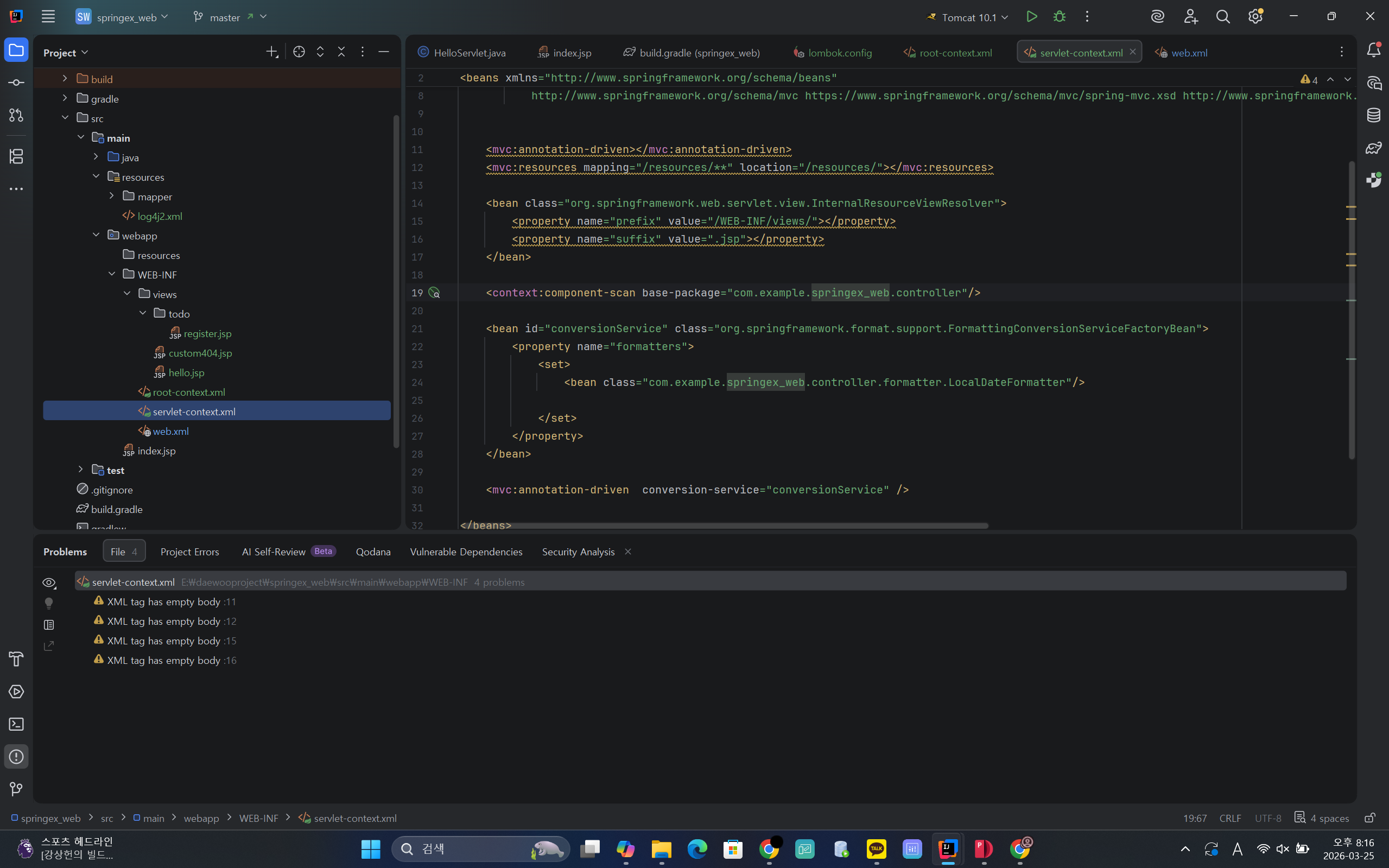
springex_web으로 변경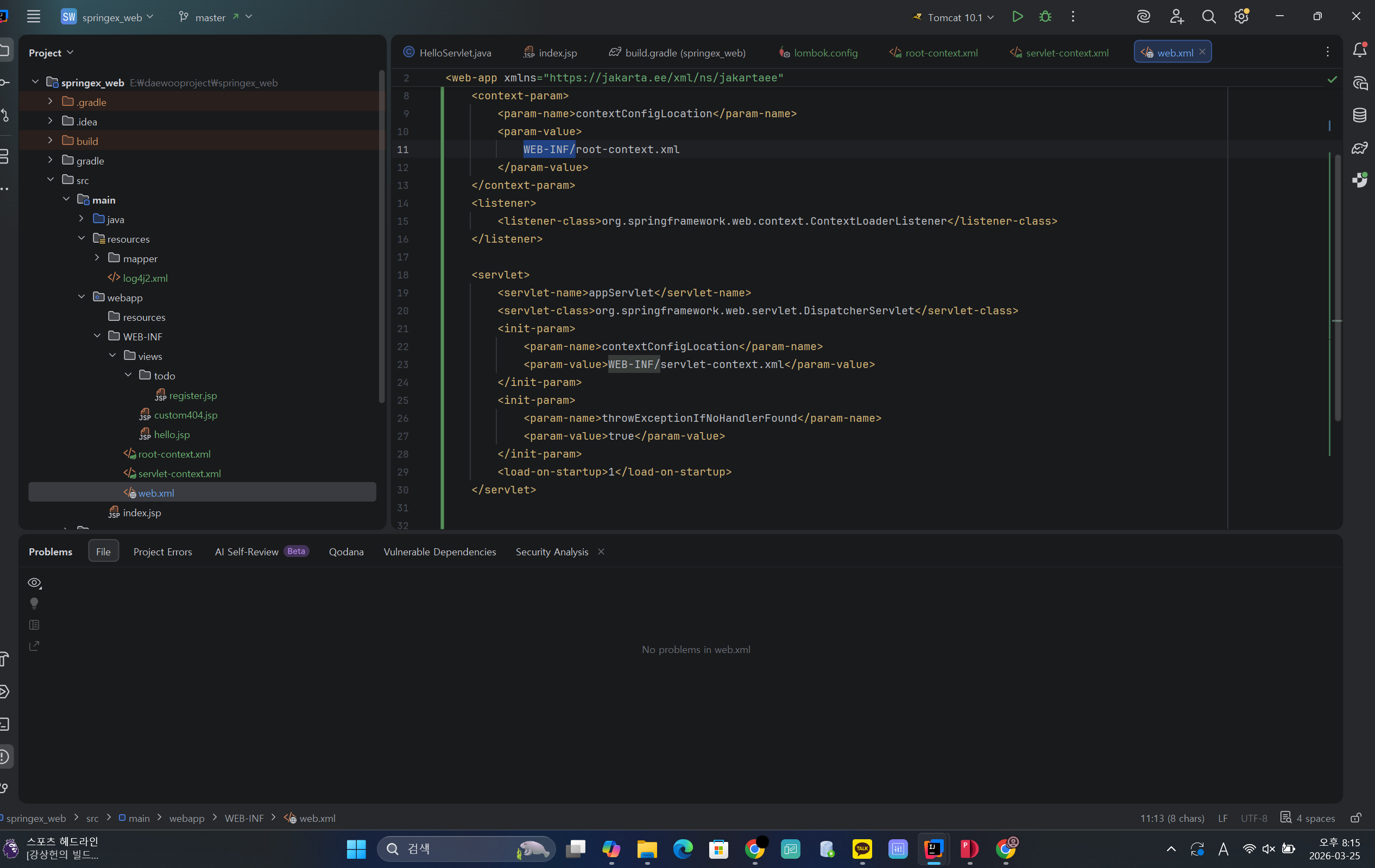
WEB-INF/로 경로변경
dto에
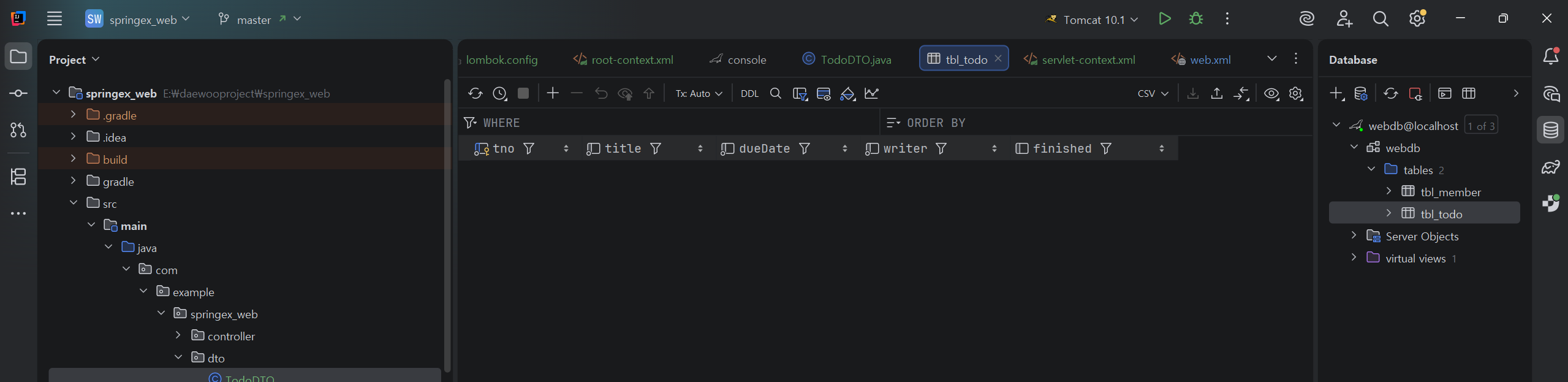
private String writer;이 구문을 추가했으니 console에 아래의 구문을 입력해서
tbl_todo 테이블을 바꿔야함
drop table tbl_todo;
create table tbl_todo (
                          tno int auto_increment primary key ,
                          title varchar(100) not null,
                          dueDate date not null,
                          writer varchar(50) not null,
                          finished tinyint default 0
);
그럼 writer가 들어간 tbl_todo가 나옴
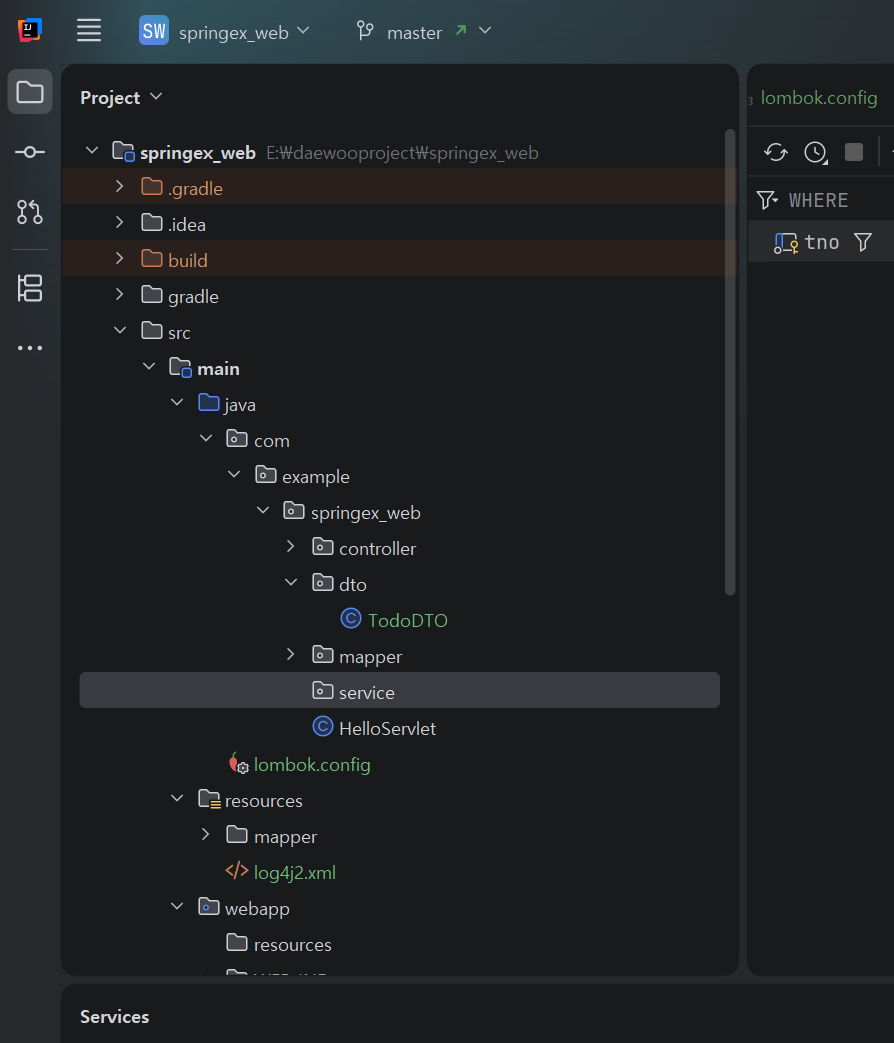
service라는 이름의 package를 추가
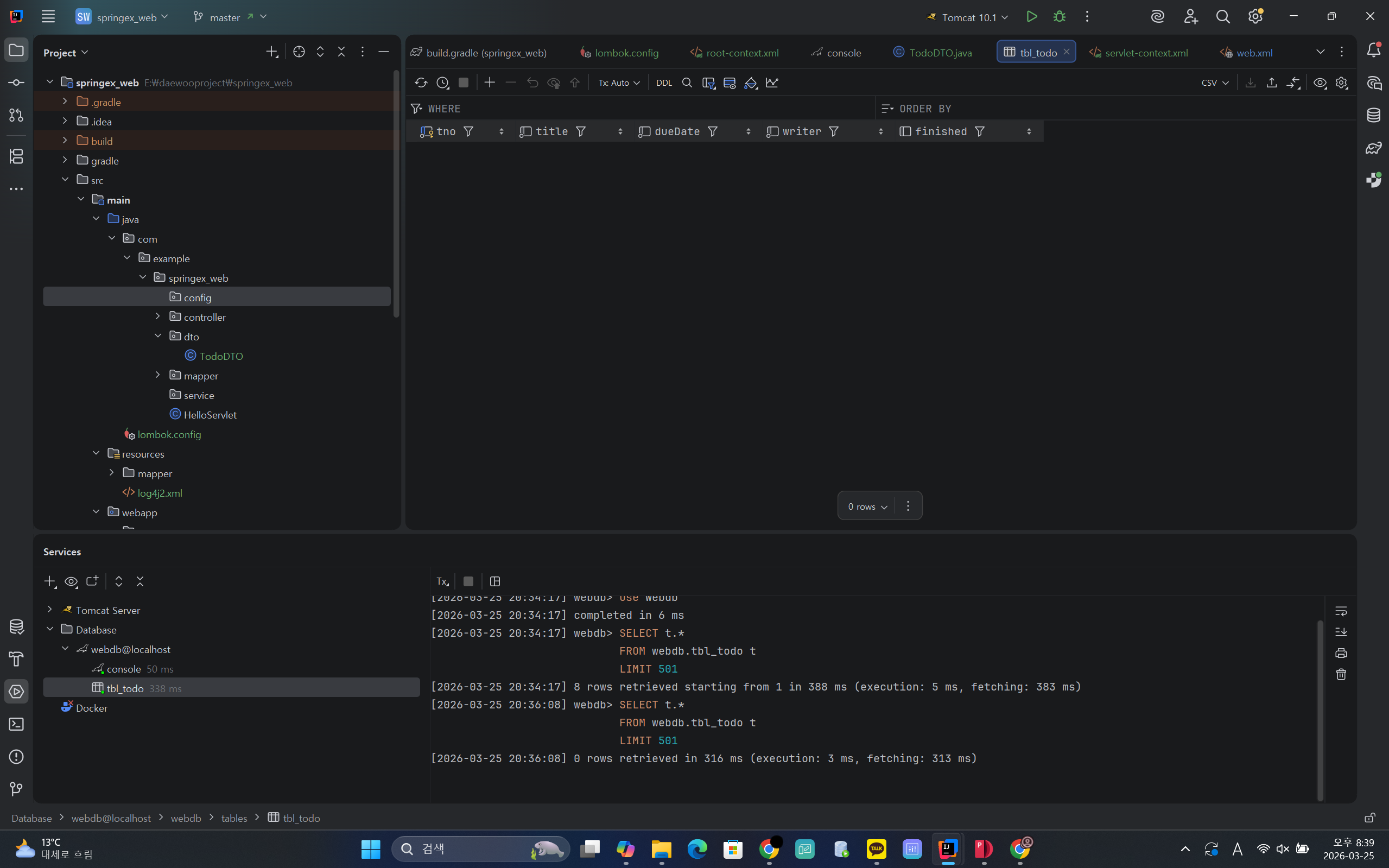
config 패키지도 추가
안에 ModelMapperConfig라는 클래스도 추가
ModelMapper설정과 @Configuration
스프링의 경우 XML파일을 통한 설정 외에도 @Configuration이 있는 클래스를
이용해서 설정을 지정할 수 있음
package com.example.springex_web.config;

import org.modelmapper.ModelMapper;
import org.modelmapper.convention.MatchingStrategies;
import org.springframework.context.annotation.Bean;
import org.springframework.context.annotation.Configuration;

@Configuration
// bean 설정에 대한 클래스다라는 것을 보여줌
public class ModelMapperConfig {
    @Bean
    public ModelMapper getMapper() {
        ModelMapper modelMapper = new ModelMapper();
        modelMapper.getConfiguration()
                .setFieldMatchingEnabled(true)
                .setFieldAccessLevel(org.modelmapper.config.Configuration.AccessLevel.PRIVATE)
                .setMatchingStrategy(MatchingStrategies.LOOSE);
        return modelMapper;
    }
}
getMapper()의 결과를 bean으로 사용하겠다는 것
root-context.xml에서
<context:component-scan base-package="com.example.springex_web.config"></context:component-scan><context:component-scan base-package="com.example.springex_web.service"></context:component-scan>를 추가
Bootstrap
Powerful, extensible, and feature-packed frontend toolkit. Build and customize with Sass, utilize prebuilt grid system and components, and bring projects to life with powerful JavaScript plugins.
getbootstrap.com
사이트에서 부트스트랩을 다운받음
화면디자인 - 부트스트랩
• 부트스트랩을 이용해서 간단한 화면 구성
• 컴포넌트를 이용해서 레이아웃이나 화면 디자인 가능
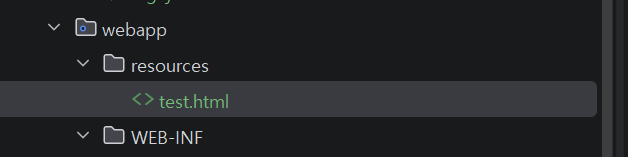
test.html을 만듬

docs quick start의 2번을
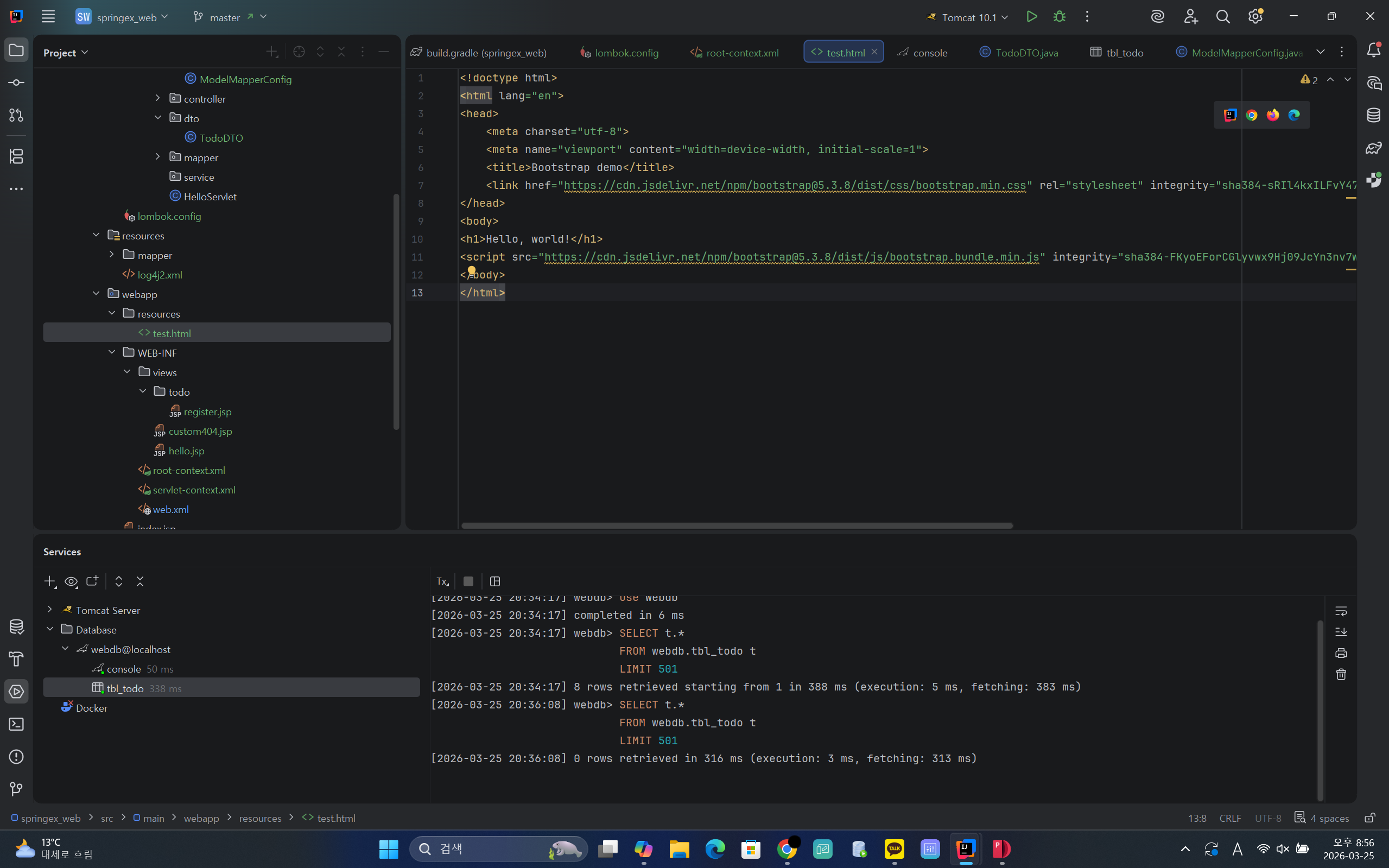
붙여넣기 함
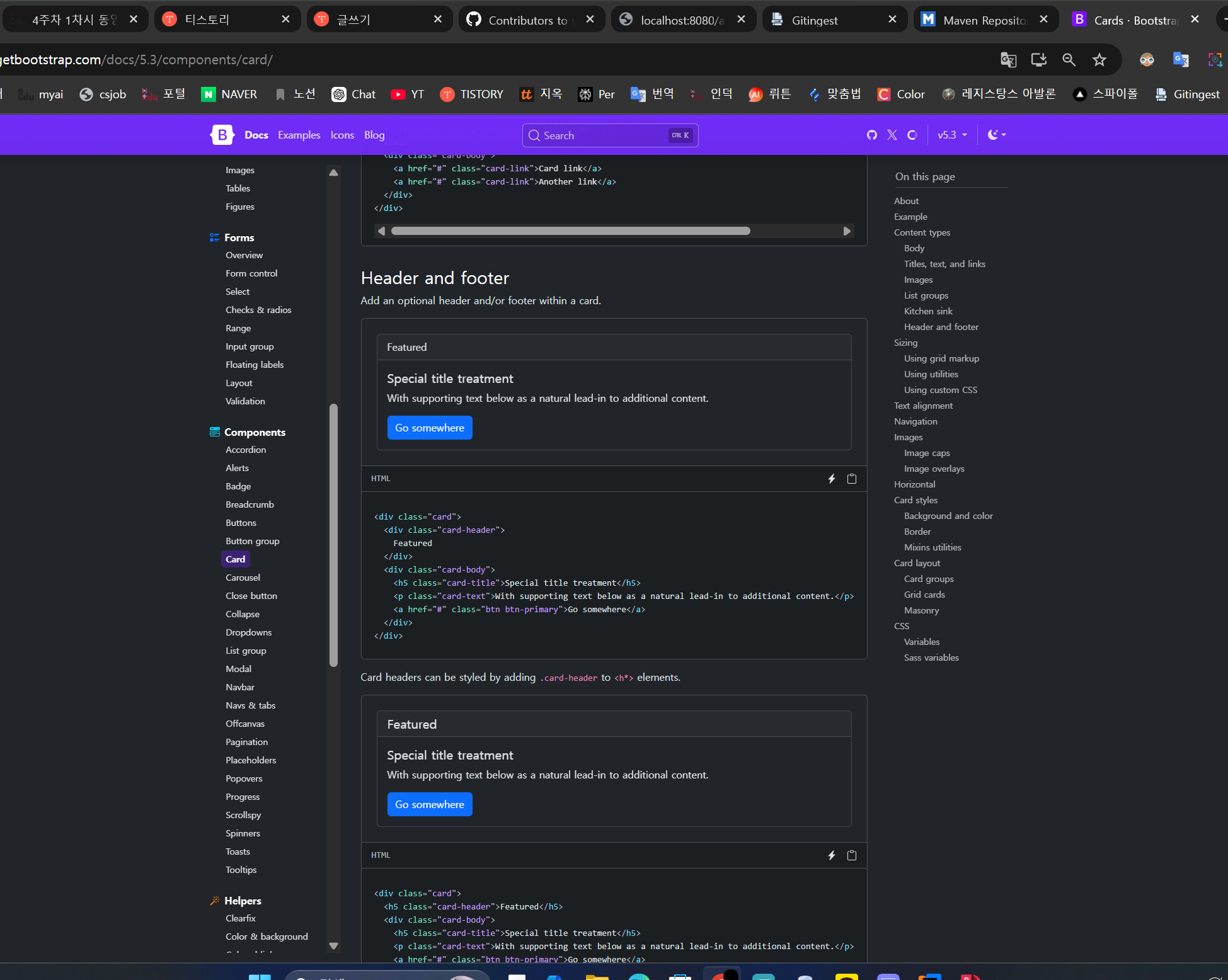
<!doctype html>
<html lang="en">
<head>
    <meta charset="utf-8">
    <meta name="viewport" content="width=device-width, initial-scale=1">
    <title>Bootstrap demo</title>
    <link href="https://cdn.jsdelivr.net/npm/bootstrap@5.3.8/dist/css/bootstrap.min.css" rel="stylesheet" integrity="sha384-sRIl4kxILFvY47J16cr9ZwB07vP4J8+LH7qKQnuqkuIAvNWLzeN8tE5YBujZqJLB" crossorigin="anonymous">
</head>
<body>
<!--<h1>Hello, world!</h1>-->
<div class ="container-fluid">
    <div class="row">
        <h1>Header</h1>
    </div>
    <div class="row content">

        <div class="col">
            <div class="card">
                <div class="card-header">
                    Featured
                </div>
                <div class="card-body">
                    <h5 class="card-title">Special title treatment</h5>
                    <p class="card-text">With supporting text below as a natural lead-in to additional content.</p>
                    <a href="#" class="btn btn-primary">Go somewhere</a>
                </div>
            </div>

        </div>
        <h1>Content</h1>
    </div>
    <div class="row content">

        <h1>Content</h1>
    </div>

    <div class="row footer">
        <h1>Footer</h1>
    </div>
</div>
<script src="https://cdn.jsdelivr.net/npm/bootstrap@5.3.8/dist/js/bootstrap.bundle.min.js" integrity="sha384-FKyoEForCGlyvwx9Hj09JcYn3nv7wiPVlz7YYwJrWVcXK/BmnVDxM+D2scQbITxI" crossorigin="anonymous"></script>
</body>
</html>
header 태그 만들기

<!doctype html>
<html lang="en">
<head>
    <meta charset="utf-8">
    <meta name="viewport" content="width=device-width, initial-scale=1">
    <title>Bootstrap demo</title>
    <link href="https://cdn.jsdelivr.net/npm/bootstrap@5.3.8/dist/css/bootstrap.min.css" rel="stylesheet" integrity="sha384-sRIl4kxILFvY47J16cr9ZwB07vP4J8+LH7qKQnuqkuIAvNWLzeN8tE5YBujZqJLB" crossorigin="anonymous">
</head>
<body>
<!--<h1>Hello, world!</h1>-->
<div class ="container-fluid">
    <div class="row">
<!--        <h1>Header</h1>-->

        <div class="col">
            <nav class="navbar navbar-expand-lg bg-body-tertiary">
                <div class="container-fluid">
                    <a class="navbar-brand" href="#">Navbar</a>
                    <button class="navbar-toggler" type="button" data-bs-toggle="collapse" data-bs-target="#navbarNav" aria-controls="navbarNav" aria-expanded="false" aria-label="Toggle navigation">
                        <span class="navbar-toggler-icon"></span>
                    </button>
                    <div class="collapse navbar-collapse" id="navbarNav">
                        <ul class="navbar-nav">
                            <li class="nav-item">
                                <a class="nav-link active" aria-current="page" href="#">Home</a>
                            </li>
                            <li class="nav-item">
                                <a class="nav-link" href="#">Features</a>
                            </li>
                            <li class="nav-item">
                                <a class="nav-link" href="#">Pricing</a>
                            </li>
                            <li class="nav-item">
                                <a class="nav-link disabled" aria-disabled="true">Disabled</a>
                            </li>
                        </ul>
                    </div>
                </div>
            </nav>

        </div>
    </div>
    <div class="row content">

        <div class="col">
            <div class="card">
                <div class="card-header">
                    Featured
                </div>
                <div class="card-body">
                    <h5 class="card-title">Special title treatment</h5>
                    <p class="card-text">With supporting text below as a natural lead-in to additional content.</p>
                    <a href="#" class="btn btn-primary">Go somewhere</a>
                </div>
            </div>

        </div>
        <h1>Content</h1>
    </div>
    <div class="row content">

        <h1>Content</h1>
    </div>

    <div class="row footer">
        <h1>Footer</h1>
    </div>
</div>
<script src="https://cdn.jsdelivr.net/npm/bootstrap@5.3.8/dist/js/bootstrap.bundle.min.js" integrity="sha384-FKyoEForCGlyvwx9Hj09JcYn3nv7wiPVlz7YYwJrWVcXK/BmnVDxM+D2scQbITxI" crossorigin="anonymous"></script>
</body>
</html>
이후에 footer 코드까지 추가
<!doctype html>
<html lang="en">
<head>
    <meta charset="utf-8">
    <meta name="viewport" content="width=device-width, initial-scale=1">
    <title>Bootstrap demo</title>
    <link href="https://cdn.jsdelivr.net/npm/bootstrap@5.3.8/dist/css/bootstrap.min.css" rel="stylesheet" integrity="sha384-sRIl4kxILFvY47J16cr9ZwB07vP4J8+LH7qKQnuqkuIAvNWLzeN8tE5YBujZqJLB" crossorigin="anonymous">
</head>
<body>
<!--<h1>Hello, world!</h1>-->
<div class ="container-fluid">
    <div class="row">
<!--        <h1>Header</h1>-->

        <div class="col">
            <nav class="navbar navbar-expand-lg bg-body-tertiary">
                <div class="container-fluid">
                    <a class="navbar-brand" href="#">Navbar</a>
                    <button class="navbar-toggler" type="button" data-bs-toggle="collapse" data-bs-target="#navbarNav" aria-controls="navbarNav" aria-expanded="false" aria-label="Toggle navigation">
                        <span class="navbar-toggler-icon"></span>
                    </button>
                    <div class="collapse navbar-collapse" id="navbarNav">
                        <ul class="navbar-nav">
                            <li class="nav-item">
                                <a class="nav-link active" aria-current="page" href="#">Home</a>
                            </li>
                            <li class="nav-item">
                                <a class="nav-link" href="#">Features</a>
                            </li>
                            <li class="nav-item">
                                <a class="nav-link" href="#">Pricing</a>
                            </li>
                            <li class="nav-item">
                                <a class="nav-link disabled" aria-disabled="true">Disabled</a>
                            </li>
                        </ul>
                    </div>
                </div>
            </nav>

        </div>
<!--        header 끝-->
    </div>
    <div class="row content">
        <!--        <h1>Content</h1>-->
        <div class="col">
            <div class="card">
                <div class="card-header">
                    Featured
                </div>
                <div class="card-body">
                    <h5 class="card-title">Special title treatment</h5>
                    <p class="card-text">With supporting text below as a natural lead-in to additional content.</p>
                    <a href="#" class="btn btn-primary">Go somewhere</a>
                </div>
            </div>

        </div>

    </div>
<!--    row content 끝 -->
    <div class="row content">

        <h1>Content</h1>
    </div>

    <div class="row footer">
<!--        <h1>Footer</h1>-->
        <div class="row fixed-botom" style="z-index: -100">
            <footer class="py-1 my-1">
                <p class="text-center text-muted">Footer</p>
            </footer>
        </div>
    </div>
</div>
<script src="https://cdn.jsdelivr.net/npm/bootstrap@5.3.8/dist/js/bootstrap.bundle.min.js" integrity="sha384-FKyoEForCGlyvwx9Hj09JcYn3nv7wiPVlz7YYwJrWVcXK/BmnVDxM+D2scQbITxI" crossorigin="anonymous"></script>
</body>
</html>
footer 코드도 추가
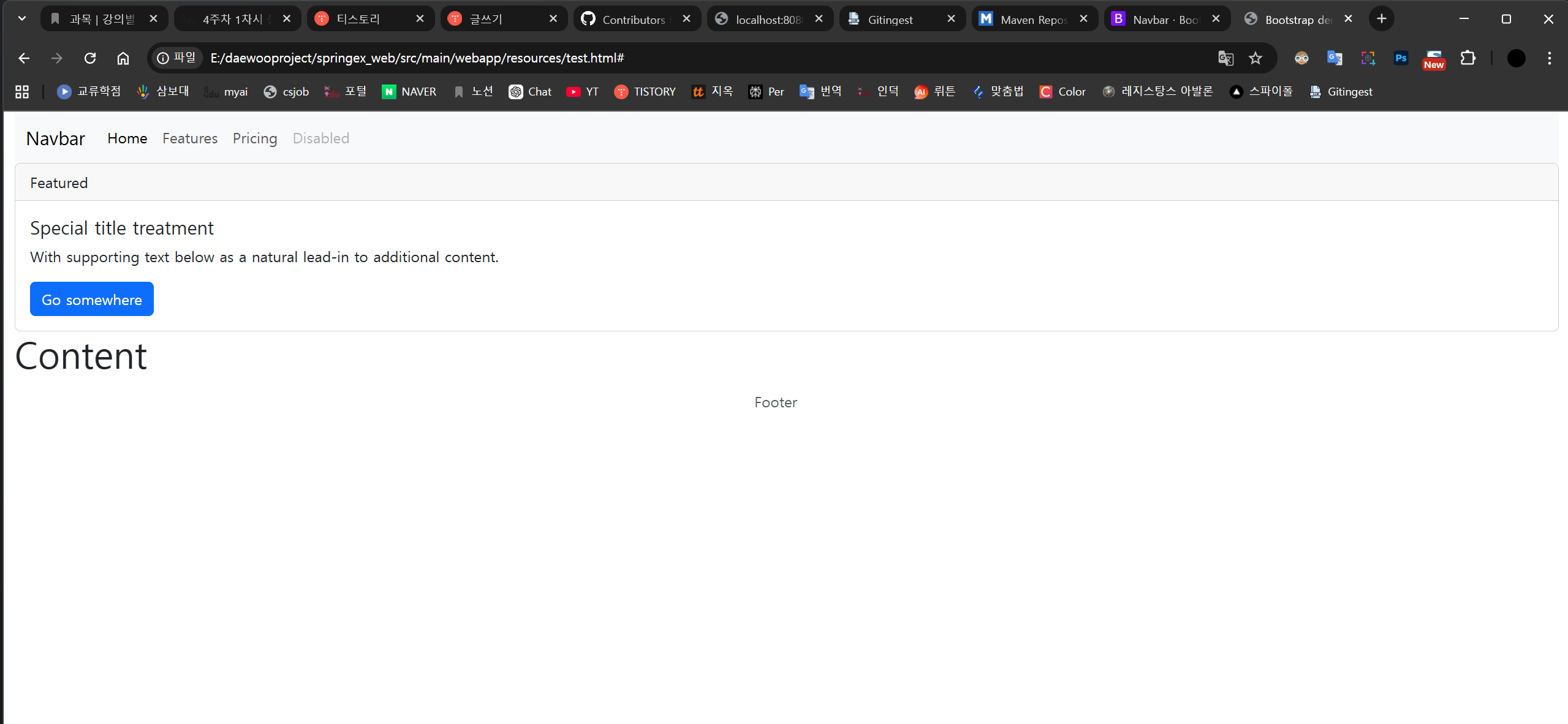
그럼 이런 페이지가 만들어짐
'대우개발원 수업 내용 > spring boot, framework' 카테고리의 다른 글
| 자바 프레임워크 8일차 springex_web(Read, Delete, Update) (0) | 2026.03.27 |
|---|---|
| 자바 프레임워크 7일차 springex_web(Spring MVC & 데이터베이스 연동 핵심 기능 구현) (0) | 2026.03.26 |
| 자바 프레임워크 5 (Spring) (0) | 2026.03.24 |
| 자바 프레임워크 4 (0) | 2026.03.18 |
| 자바프레임워크 1~3일차 (0) | 2026.03.17 |